How it knows the game
A library of 228 games maps their executables to proper names and genres; generic names such as
launcher.exe are not trusted on their own. For Steam games PC Workman also reads the
manifest next to the game, so a game outside the library still gets its real name.
A calm note, not a pop-up storm
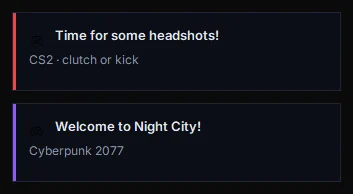
The first time you start a game the note welcomes it; later ones vary, in the tone of its genre: 14 pools for shooters, RPGs, racing, strategy and others. It sits in a corner for a few seconds and fades out. You can turn it off.
Every session kept
A session records the game, when it ran, how long, and the CPU and graphics card load and temperatures meanwhile, in Activity Memory. Your profile shows hours of gaming and the longest-played game, and hck_GPT can tell you which game works the PC hardest.
Questions
How do I see how long I played?
Your profile in PC Workman shows hours of gaming and the longest-played game; each session is in Activity Memory with its time and load.
Which games does it recognise?
228 games from its library, and any Steam game through its manifest. Others are shown by their file name.
Can I turn the game note off?
Yes, in Settings. Sessions are still recorded.
How to open it
In PC Workman the note appears by itself when a game starts. Sessions are in My PC › Gaming / In-Game and in your profile.
Works since PC Workman 1.9.3 · page updated 2026-11-21 · Windows 10 and 11