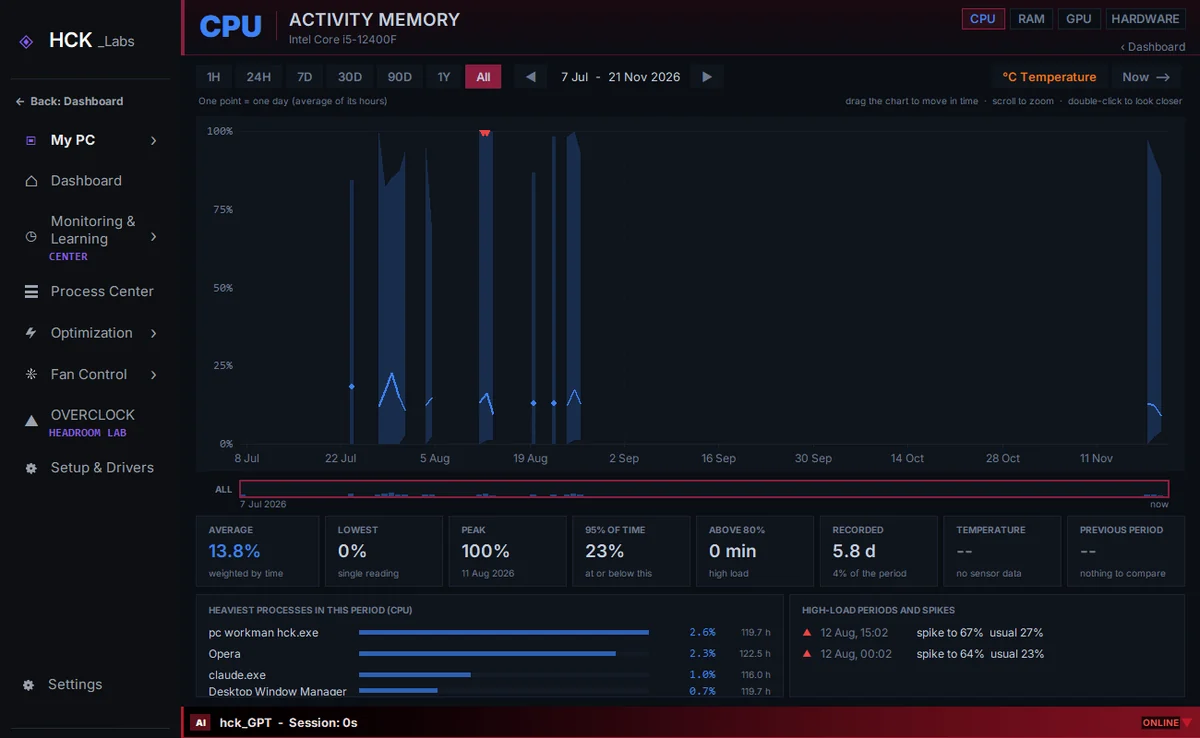
Why history matters
A PC rarely gets slow while you watch Task Manager. It gets slow during a game on Friday, when an update runs at night, or a little more every month after a Windows update. Without history you can only guess. Activity Memory records CPU, graphics card and memory use while PC Workman runs, together with the processes that caused it.
Moving in time
- Ranges: 1 hour, 24 hours, 7 days, 30 days, 90 days, a year, or everything.
- Drag the chart to move in time, scroll to zoom, double-click to look closer at one moment.
- Under the chart: average, lowest, peak with its date, the level the PC stays under 95% of the time, minutes above 80%, how much was recorded, temperature, and the same numbers for the previous period.
- The heaviest processes of the period with their share and hours, and high-load periods and spikes with the usual level next to them: "12 Aug, 15:02, spike to 67%, usual 27%".
How long it keeps what
Every minute for the last 7 days, every hour for 90 days, and one point a day for good, in a local database on your disk. Nothing leaves the PC. History is written only while PC Workman runs, and the page says so instead of drawing a flat line.
That is enough to compare this month with the same month half a year ago, before a Windows or driver update, and see whether the PC really got slower or only feels that way.
Activity Memory and the tools you know
| PC Workman Activity Memory | Task Manager | Resource Monitor | Performance Monitor (perfmon) | |
|---|---|---|---|---|
| History length | Months (daily for good) | About a minute | About a minute | While you log |
| Process behind a spike | Yes | Only now | Only now | If you set it up |
| Set-up needed | None | None | None | Data collector sets |
| Compare with the previous period | Yes | No | No | By hand |
Where the others are better. Performance Monitor can record any of hundreds of Windows counters at any rate. If you need one exact counter, it is the tool. Activity Memory records the few numbers that answer "what slowed my PC" without any set-up.
Questions
How do I see what slowed my PC yesterday?
Open Activity Memory, pick 24 hours, find the spike on the chart and read the heaviest processes and the spikes list under it. Drag the chart to the exact hour.
Does PC Workman record when it is closed?
No. History is written only while PC Workman runs, in the tray or in the window. Gaps on the chart are times it was not running.
How long is the history kept?
Minute data for 7 days, hourly data for 90 days, and a daily summary for good, on your own disk.
Is my PC slower than half a year ago?
Put the same kind of month side by side: the average load, the time above 80% and the heaviest processes show whether something new is running or the same work takes longer.
How to open it
In PC Workman: click a CPU, RAM or GPU card on the Dashboard, or Monitoring & Learning › Time Travel. hck_GPT links there when it answers "why was my PC slow".
Works since PC Workman 1.9.3 · page updated 2026-11-21 · Windows 10 and 11