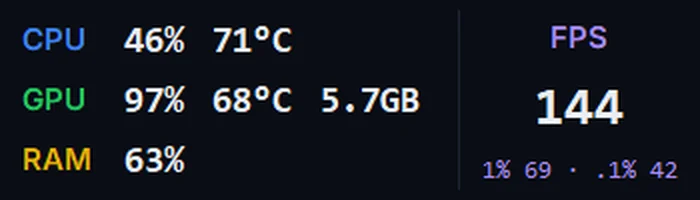
What it shows
Default
CPU and GPU load and temperature, RAM, FPS.
Compact
CPU, GPU and RAM load. Three numbers, nothing else.
Pro
Adds the CPU clock, VRAM and the 12 V rail: nine values.
Your own
Pick from CPU %, temperature, clock, power; GPU %, temperature, VRAM, power; RAM % and GB; 12 V; FPS.
Rows per component in their own colour, FPS in a tall box on the right. Sizes S, M and L, themes dark, slate and high contrast, and opacity to taste. A click moves it to the next corner.
Where FPS comes from
When MSI Afterburner or RivaTuner Statistics Server runs, PC Workman reads the frame rate from it. When it does not, the FPS box says "--" instead of guessing. Everything else (load, temperatures, clocks) comes from PC Workman itself, so the overlay works without installing anything else, on NVIDIA, AMD and Intel.
The overlay window never takes focus, so a click in the game stays in the game. It floats over games in borderless or windowed mode.
Overlay, Afterburner with RTSS, NVIDIA App
| PC Workman overlay | MSI Afterburner + RTSS | NVIDIA App overlay | |
|---|---|---|---|
| Needs extra software | No (RTSS only for FPS) | Two programs | NVIDIA App |
| Graphics cards | Any | Any | NVIDIA only |
| Presets | Default, Compact, Pro | Build your own | Basic, Standard, Advanced |
| Exclusive full-screen games | Borderless and windowed | Yes | Yes |
| Linked to history and the learned norm | Yes | No | No |
Where the others are better. RTSS hooks into the game itself, so it works in exclusive full screen and draws a frame time graph. If you tune a game frame by frame, keep it; PC Workman reads its FPS and frame times and shows 1% and 0.1% low under the FPS.
Questions
How do I show FPS and temperatures in a game?
Turn on the overlay in PC Workman's Gaming tile, pick Default, Compact or Pro, and start the game in borderless or windowed mode. For FPS, keep MSI Afterburner or RTSS running.
Does the overlay lower FPS?
Barely: it is a small window that refreshes a few times a second and never hooks into the game.
Why does the FPS box show --?
PC Workman reads FPS from RivaTuner Statistics Server. When RTSS is not running, it shows -- instead of a made-up number.
How to open it
In PC Workman: My PC › Gaming / In-Game, choose a preset and turn the overlay on.
Works since PC Workman 1.9.3 · page updated 2026-11-21 · Windows 10 and 11