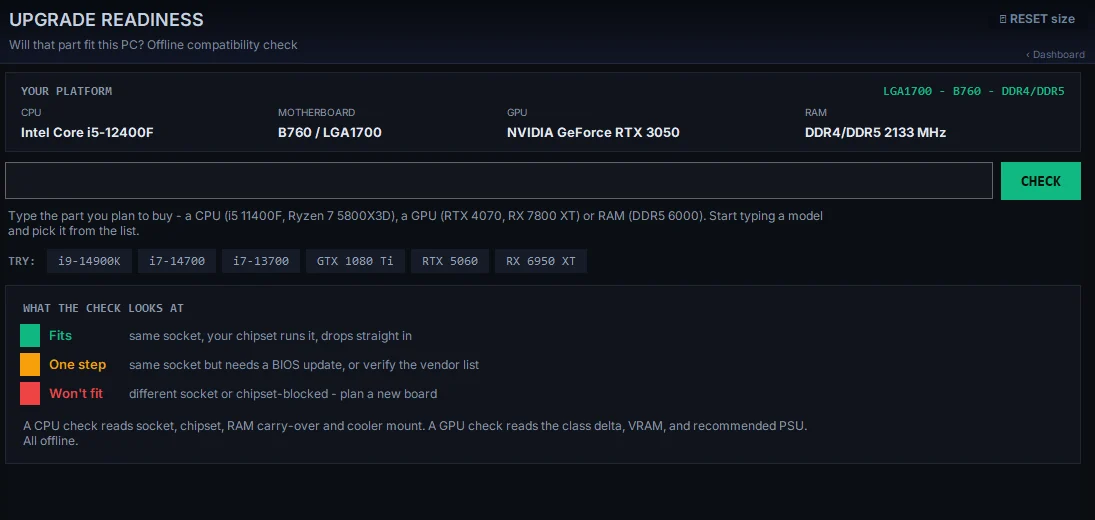
Your PC, read by itself
PCPartPicker starts with an empty list. Upgrade Readiness starts with your PC: processor, motherboard socket and chipset, graphics card, and RAM type and speed, read in a second. On mine: Intel Core i5-12400F, B760 on LGA1700, RTX 3050, DDR4 at 2133 MHz.
What the check looks at
- A CPU: the socket, whether the chipset runs it, whether the RAM carries over, and whether the cooler mount fits.
- A graphics card: its class against your current one, its VRAM, and the power supply it needs.
Fits
Same socket, your chipset runs it, it drops straight in.
One step
Same socket, but it needs a BIOS update first, or check the board maker's support list.
Will not fit
A different socket or a chipset that blocks it: it means a new board.
The library (version 2026.07.31) works offline. It is guidance: the board maker's CPU support list has the last word.
Upgrade Readiness and PCPartPicker
| PC Workman Upgrade Readiness | PCPartPicker | |
|---|---|---|
| Reads your current PC | Yes, automatically | You type it in |
| Works offline | Yes | No |
| BIOS-update step called out | Yes | Notes on some parts |
| Prices and shops | No | Yes |
| Size of the catalogue | 196 CPUs, 84 GPUs | Huge |
Where the others are better. PCPartPicker knows almost every part with prices and is the tool for building a new PC. Upgrade Readiness answers "what fits the PC I already have".
Questions
Will this CPU fit my motherboard?
Open Upgrade Readiness and type the CPU: it checks the socket and your chipset and says fits, one step (usually a BIOS update) or will not fit.
What is the best upgrade for my PC?
The Health Report and Upgrade Readiness together: if RAM is usually 75% full, memory first; if the graphics card is at 100% in games, the card. hck_GPT's upgrade plan walks through it in four steps.
Does it check the power supply for a new graphics card?
Yes: the graphics card check includes the power supply the card needs.
How to open it
In PC Workman: Upgrade Readiness from My PC, from the Health Report, or ask hck_GPT "what should I upgrade".
Works since PC Workman 1.9.3 · page updated 2026-11-21 · Windows 10 and 11