What the score is made of
| Part | Weight | What it looks at |
|---|---|---|
| Stability | 25 | Restarts without a clean shutdown, hardware and disk errors in the Windows event log |
| Drives | 20 | Free space and the state of each drive |
| Temperatures | 20 | Readings against what is normal for this PC |
| Memory | 15 | How full the RAM usually is, and whether it runs at its rated speed (XMP) |
| Drivers | 10 | The age of the graphics driver |
| Startup | 10 | How much starts with Windows |
What to do first, in plain words
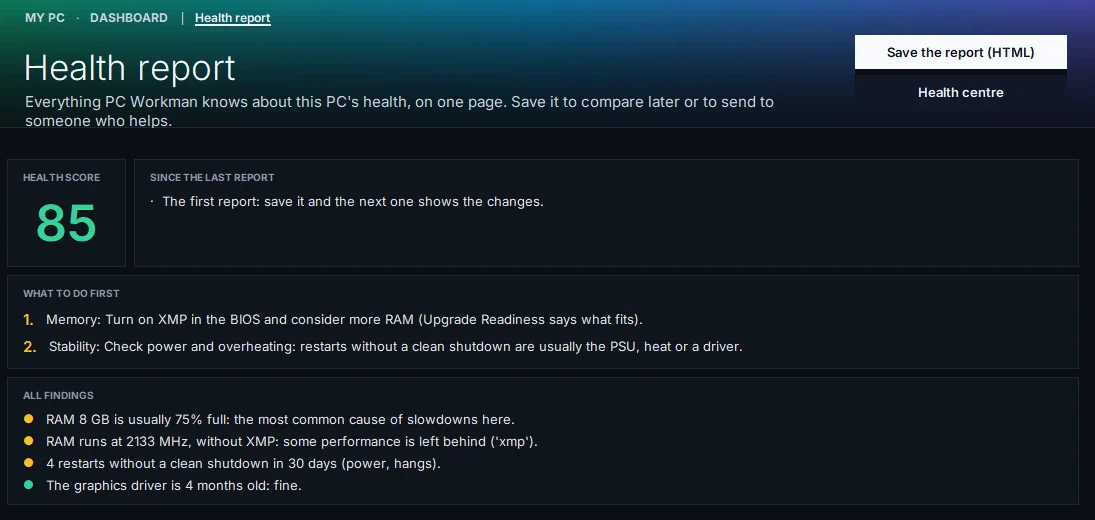
A score alone helps nobody. Under it the report lists what to do first, worst first, each with a link to the tab that fixes it. On my PC: "Memory: turn on XMP in the BIOS and consider more RAM" and "Stability: restarts without a clean shutdown are usually the power supply, heat or a driver". Then all findings, as plain sentences: "RAM 8 GB is usually 75% full", "RAM runs at 2133 MHz, without XMP some performance is left behind", "4 restarts without a clean shutdown in 30 days".
Save it, compare it, send it
Save the report (HTML) writes one file that opens in any browser, with no PC Workman needed. The next report shows what changed since the last one, part by part. Send the file to whoever helps you with your PC: it says more than "it is slow sometimes". Everything is collected locally; the report says so at the bottom.
Health Report and the alternatives
| PC Workman Health Report | Windows PC Health Check | AIDA64 report | |
|---|---|---|---|
| What it answers | Is the PC healthy, what first | Can it run Windows 11 | Everything about the hardware |
| Score with parts | Yes, 6 parts | No | No |
| What to do first | Yes | Upgrade checks | No |
| Changes since last time | Yes | No | No |
| Price | Free, open source | Free | About 60 USD |
Where the others are better. An AIDA64 report lists every detail of every device, which a repair shop sometimes needs. The Health Report is the page you read in a minute and act on.
Questions
How do I check if my PC is healthy?
Open My PC › Health report in PC Workman. It reads the event log, drives, temperatures, memory, drivers and startup and gives a score out of 100 with what to do first.
Why does my PC restart without warning?
Restarts without a clean shutdown are usually the power supply, overheating or a driver. The report counts them over 30 days; the temperature history and the drivers page help find which one.
What is XMP and why does the report mention it?
XMP is the memory profile that runs RAM at its rated speed. With it off, RAM runs at a slower default (2133 MHz on my PC). Turning it on in the BIOS is free performance.
How to open it
In PC Workman: My PC › Health report. Ask hck_GPT "is my PC healthy" for a summary in the chat.
Works since PC Workman 1.9.3 · page updated 2026-11-21 · Windows 10 and 11