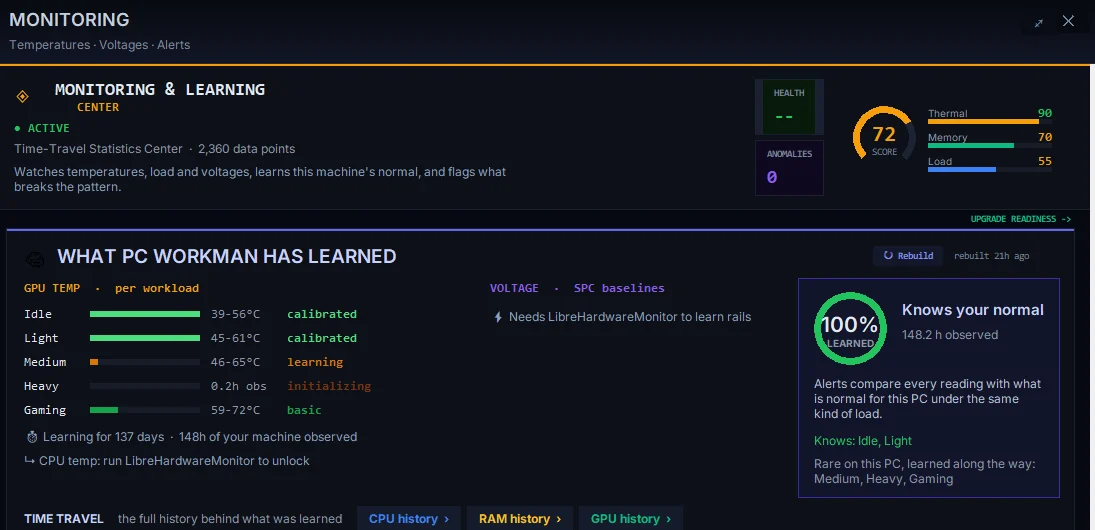
A norm for each kind of load
PC Workman saves every reading together with the load at that moment and sorts it into five kinds of load: idle, light, medium, heavy and gaming. For each it learns a normal range. On my PC, for the graphics card: idle 39 to 56 °C, light 45 to 61 °C, gaming 59 to 72 °C.
Each kind of load shows how far it got: initializing, learning, basic, calibrated. Loads this PC rarely sees are learned along the way and shown apart, so a PC that almost never runs heavy work is not stuck at "learning" for ever.
Alerts that compare like with like
An alert compares a reading with the norm for the same kind of load. 75 °C in a game inside the gaming range is fine; 75 °C on an idle desktop is not, and that one gets flagged, with a line on why. The fewer false alarms, the more the real ones mean.
Voltages: slow drift, caught early
A power supply rarely dies in one second. Its 12 V rail sags a little more every month. Statistical process control, the method factories use to catch a machine going out of tune, learns the normal spread of each rail and flags a reading or a trend that leaves it, long before a fixed limit would. Voltages come from LibreHardwareMonitor running in the background.
The health score
The top of the page shows a health score with its parts (thermal, memory, load) and the number of anomalies, plus Time Travel buttons to the history behind what was learned. The Health Report turns the same data into a page you can save.
Questions
Is 82 °C too hot for a CPU?
Under load usually not: many CPUs slow down to protect themselves only around 95 to 100 °C. With nothing running, it points to a cooling problem. PC Workman compares the reading with this PC's norm under the same load.
What is a normal GPU temperature while gaming?
For most cards somewhere between 60 and 80 °C, depending on the cooler and the case. On my PC the learned gaming range is 59 to 72 °C. What matters is the change: a card that ran 70 °C and now runs 85 °C in the same game needs cleaning.
How long does learning take?
The common loads are calibrated after a few days of normal use. My PC reached 100% after 148 hours observed. Rare loads keep learning along the way.
Why does it say it needs LibreHardwareMonitor?
Windows does not give the CPU temperature and voltages to programs directly. PC Workman reads them from LibreHardwareMonitor running in the background; the graphics card temperature on NVIDIA works without it.
How to open it
In PC Workman: Monitoring & Learning in the side menu. Ask hck_GPT "is my temperature normal" for the same answer in the chat.
Works since PC Workman 1.9.3 · page updated 2026-11-21 · Windows 10 and 11