What it tests
Processor
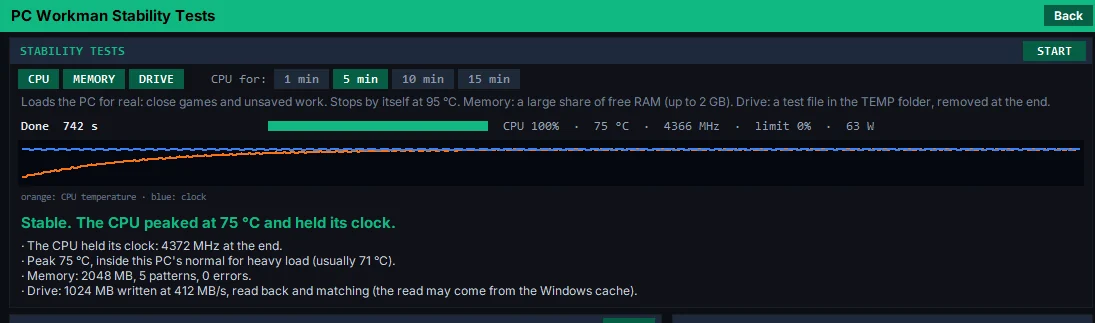
All cores under a steady, realistic load; temperature, clock and performance limit watched every second, power where a sensor reports it.
Memory
Patterns written and read back across half of the free RAM (up to 2 GB); any mismatch is an error, not a guess.
Drives
Sustained read and write on a test file; speed and temperature over time, the file removed afterwards.
Before anything runs, PC Workman checks its own files and its history database, so a broken install is not mistaken for unstable hardware.
A verdict, not a log
Prime95 or OCCT end with numbers you interpret yourself. Stability Tests end with a sentence, for example: "Stable. The CPU peaked at 78 °C, inside its normal for heavy load, and held its clock." or "Stable, but 12 °C above this PC's normal for the same load: check the cooler." or "The clock dropped at 95 °C: the CPU slowed down to protect itself."
The comparison uses the normal that Monitoring & Learning has learned for this PC, so a result means something for your machine.
Stability Tests, Prime95, OCCT, AIDA64
| PC Workman Stability Tests | Prime95 | OCCT | AIDA64 stability test | |
|---|---|---|---|---|
| Load | Realistic | Heavier than real work | Many modes | Many components |
| Temperatures during the run | Yes | No | Yes | Yes |
| Verdict in plain words | Yes | No | Pass or fail | No |
| Compared with this PC's normal | Yes | No | No | No |
| Price | Free, open source | Free | Free and paid | About 60 USD |
Where the others are better. For overclockers, OCCT and Prime95 push harder and longer and find the last unstable millivolt. Stability Tests answer the everyday question: is this PC fine under the load I give it?
Questions
How do I check if my PC is stable?
Run the CPU and memory tests in PC Workman for a few minutes with nothing else open. The verdict says whether it held its clock and temperature inside its normal and whether any memory error appeared.
Is Prime95 safe?
Prime95 loads a CPU harder than any real program, which can push it to its temperature limit. It is useful for overclocking, but for a normal PC a realistic load says more about everyday stability.
How long should a stability test run?
For everyday use, 10 to 15 minutes shows whether the cooling keeps up. For an overclock, hours, with a dedicated tool.
How to open it
In PC Workman: My PC › Stability Tests.
Works since PC Workman 1.9.3 · page updated 2026-11-21 · Windows 10 and 11