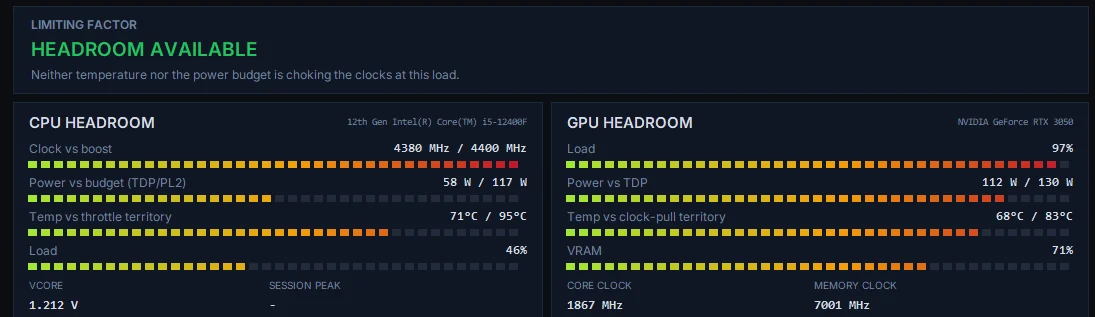
What it measures
- Clock against boost: how close the CPU and the graphics card run to their maximum clock.
- Power against budget: package power against the limit (TDP/PL2) and board power against TDP on the card.
- Temperature against throttle territory: how far each part is from the point where it slows down.
- Live load, voltage and the session peak next to them, in Afterburner-style segmented bars.
One verdict
The limiting factor reads all of that and says one thing: thermal-limited (better cooling gives more), power-limited (the power budget is the wall), headroom (neither is reached), or idle (nothing under load to measure, start a game or a render). Below it, what PC Workman learns: averages for idle, medium, heavy and gaming load from the history.
Why read only
A wrong voltage can cost a CPU. PC Workman never writes clocks, voltages or power limits; it measures and explains, and leaves the changes to the tools built for them. With RTSS running, a corner shows live FPS next to the power draw, so you see efficiency, not only speed.
Questions
Is my CPU thermal throttling?
Run a game or a render and open Headroom Lab: if the verdict is thermal-limited, the CPU is slowing down because of heat and better cooling or a cleaner cooler gives speed back.
Does PC Workman overclock?
No, never. Headroom Lab is read only. It tells you whether there is room, and the overclocking itself is up to tools like MSI Afterburner or Intel XTU.
What does power-limited mean?
The part is at its power budget before it gets hot. More speed would need a higher power limit, which on many laptops cannot be changed.
How to open it
In PC Workman: OVERCLOCK › Headroom Lab in the side menu. Start a game or a render first, so there is load to measure.
Works since PC Workman 1.9.3 · page updated 2026-11-21 · Windows 10 and 11