HWiNFO, CCleaner, MSI Afterburner: the question none of them answers
Every Windows PC I have ever set up got the same programs in its first hour: HWiNFO to see the sensors, CCleaner to clean, MSI Afterburner for the overlay, the graphics card maker's tool, and lately Microsoft PC Manager because it was already there. They are good programs. Some of them are excellent. And together they gave me more than three hundred numbers and not one answer to the question I actually had: is my PC all right, and if not, what do I do?
I started PC Workman on a laptop from 2014, in the evenings after shifts in a warehouse in the Netherlands. I lost that job three days before Christmas 2025. Since July 2026 I drive a taxi in Radom, ten to twelve hours a day, and build in the hours around it. This article is what I learned from using the big tools for years and then trying to build the thing they leave out. It is not a takedown. Where they win, it says so.
- Three hundred numbers, no answer
- HWiNFO: the most complete sensor reader
- CCleaner: the cleaner everyone knows
- MSI Afterburner: the overclocking standard
- ASUS GPU Tweak III: profiles and lows
- Microsoft PC Manager: the boost button
- All of it in one table
- What PC Workman does not do
- What is coming
- Why it is free, and why GPL now
- FAQ
Three hundred numbers, no answer
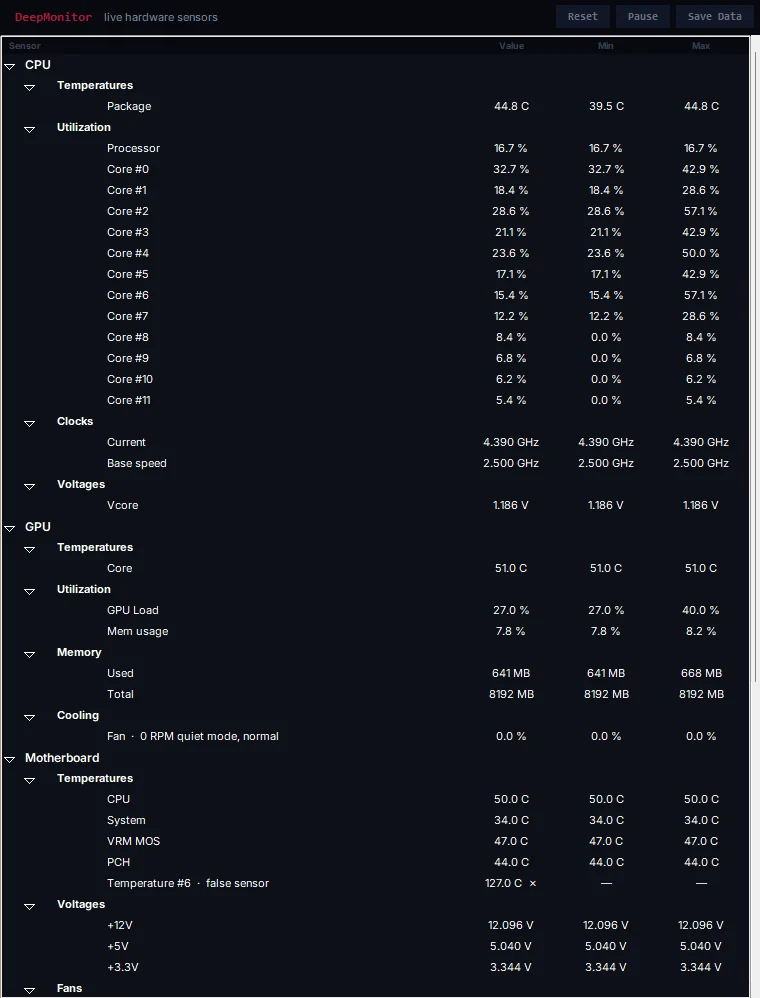
Open a sensor reader on a normal gaming PC and count the rows. On mine it is well over a hundred for the motherboard alone, before the CPU and the graphics card. There are four CPU temperatures. There is a sensor called "Temperature #6" sitting at 127 °C while the PC runs quietly at idle. The tool shows it in the same font and the same colour as everything else.
So which CPU temperature is the real one? Is 71 °C in a game fine for this PC? Is the 127 °C a fire or a broken sensor? Is my game slow because of the graphics card, or because 8 GB of RAM is full? The tools have the data to answer every one of these questions. They leave the answer to you, and most people do not know it. That gap is what PC Workman is for.
HWiNFO: the most complete sensor reader
It reads almost every sensor on almost every board, its logging is precise, and enthusiasts trust it for good reason. It is free for personal use, with a Pro version for business. If you need one obscure voltage on one obscure chip, HWiNFO is the tool.
The question it leaves to you: which reading do I trust, and what is normal for this PC?
- One CPU temperature, chosen for you. Intel exposes CPU Package and Core Max, AMD exposes Tctl and Tdie. DeepMonitor picks the one that means something for your vendor and says why. Ask hck_GPT "which CPU temperature is the real one?" and it explains it in two sentences.
- False sensors are marked. A board that reports 127 °C, a 3.3 V rail read as 2 V, a reading that flips between 0 and 125: DeepMonitor marks them as false and the alerts, the history and the learned normal ignore them. A graphics card fan at 0 RPM at light load is explained as the card's quiet mode, not a fault.
- A normal learned per workload. 82 °C while gaming can be fine on one PC and a warning at idle on another. PC Workman learns separate ranges for idle, light, medium, heavy and gaming on your machine and judges every reading against them, not against one fixed line.
- Months of history without setting anything up. In HWiNFO you start a CSV log and open it in another program. PC Workman records from the first minute: Activity Memory goes from the last hour to everything, with the games and busy stretches marked.
Full side by side: PC Workman vs HWiNFO · the feature: DeepMonitor.
CCleaner: the cleaner everyone knows
It supports a very long list of programs, it is polished, and it has more tools around cleaning: a software updater, a driver updater and a performance optimizer, several of them in the paid version.
The question it leaves to you: what exactly is it removing, and is that safe?
Cleaners have a trust problem, and it is not paranoia. In 2017 the official CCleaner 5.33 installer shipped with malware after its build system was compromised. In 2025, after version 7, users on its own forum complained that features they had paid for disappeared and that data collection was on by default. Registry cleaning, still in CCleaner, is the part of PC cleaning that can break Windows and gains you nothing you can measure.
PC Workman's Cleanup was built the other way round:
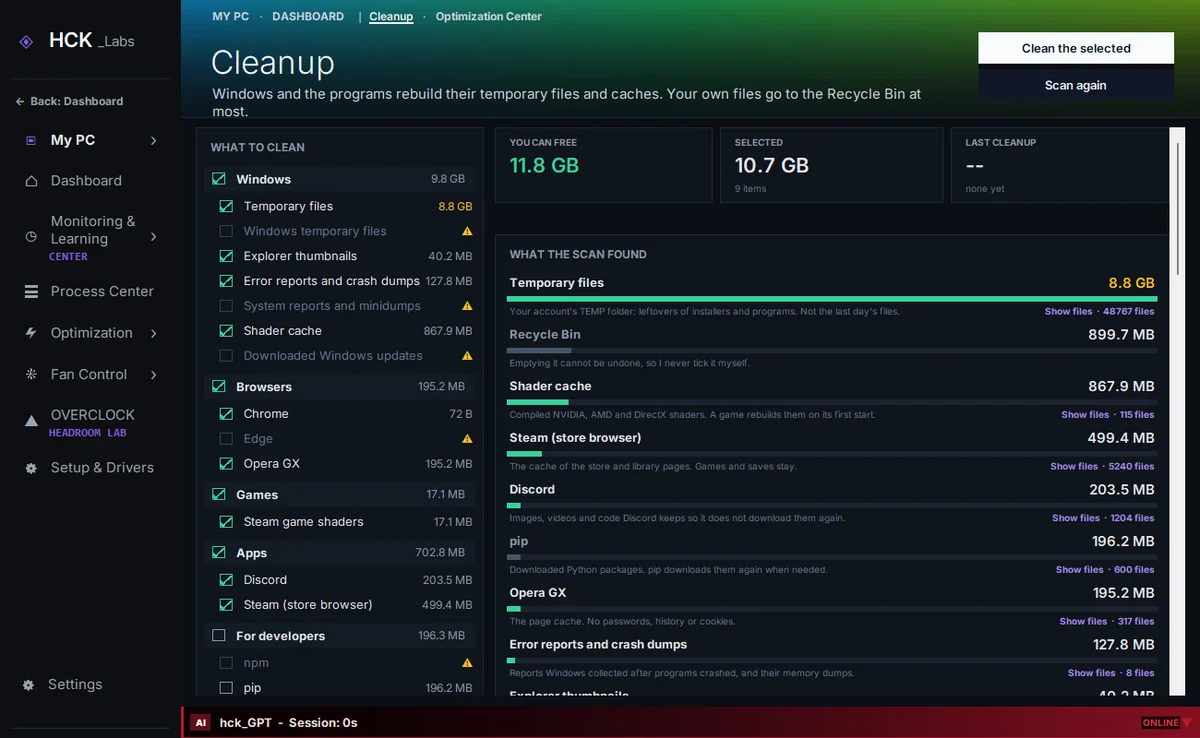
- 28 known places in Windows, six browsers, games, apps and developer tools. Fewer than CCleaner, on purpose.
- Every file listed before anything is removed, with what it is and why it is safe. Open programs are skipped, and so is every file younger than 24 hours.
- Passwords, history and cookies are never touched. Neither is the registry.
- What takes the rest of your disk, explained: hiberfil.sys, WinSxS, a Steam library, node_modules, in words, with whether you may remove it.
- Free space history with a forecast, and Duplicates compared by content (size, then a hash of both ends, then SHA-256), where the oldest copy always stays.
Full side by side: PC Workman vs CCleaner · the feature: Cleanup.
MSI Afterburner: the overclocking standard
Graphics card overclocking, an automatic OC scanner, fan curves on desktop cards, and with RivaTuner the most detailed in-game overlay there is. PC Workman does not overclock and will not pretend to.
The question it leaves to you: what is actually limiting my game, and what happened in the last session?
- What limits your clocks, as a verdict. Heat, a power limit or nothing at all, from the real clock Windows reports. psutil, which many tools use, reports the base clock: an i5-12400F "running at 2500 MHz" while it boosts to 4400.
- 1% and 0.1% low FPS in the overlay and in the summary after a game, read through RTSS. Average FPS hides stutter. The lows show it.
- History, not a session graph. Afterburner's graphs are the current session; longer history means a log file and an external log viewer. PC Workman records every game session, light ones too, with start, end, GPU peak and average, next to the rest of the PC's history.
- Fan curves on laptops. Afterburner's curves do not work there, because the laptop's own firmware drives the fans. PC Workman's Fan Dashboard is a planner today, said plainly in the app: your BIOS or the maker's tool keeps driving the fans.
Full side by side: PC Workman vs MSI Afterburner · the feature: In-game overlay.
ASUS GPU Tweak III: profiles and lows
Tuning, fan control with hysteresis, profiles that load when a game starts, and an overlay with 1% and 0.1% lows. On an ASUS card it is the most complete package.
The question it leaves to you: the same answers on any card, and on the rest of the PC?
- Game profiles on every brand. When a game from the library starts, PC Workman loads its overlay layout and, if you want, TURBO, and undoes it when the game ends.
- It never hooks into the game. PC Workman's overlay is its own window. Overlays that inject into the game are the ones that collide with each other and with anti-cheat; PC Workman leaves anti-cheat processes alone by rule.
- The whole PC, not only the graphics card. On my own PC, 7 Days to Die ran with RAM at 89% on average and 97% at the peak, while the graphics card averaged 61%. A graphics card tool shows a card with room to spare. The bottleneck is 8 GB of RAM.
Full side by side: PC Workman vs GPU Tweak III.
Microsoft PC Manager: the boost button
It is made by Microsoft, it is light, and it already sits on many PCs. Large files, duplicates, startup apps and a quick health check in one place.
The question it leaves to you: did it actually help?
In PCMag's test, Boost lowered RAM use by about 5% and raised the PCMark 10 score by 9 points, with no difference you could feel, and Deep Cleanup did not remove the Windows Update files that the built-in Disk Cleanup removes. One button that says "boosted" is a feeling, not a result.
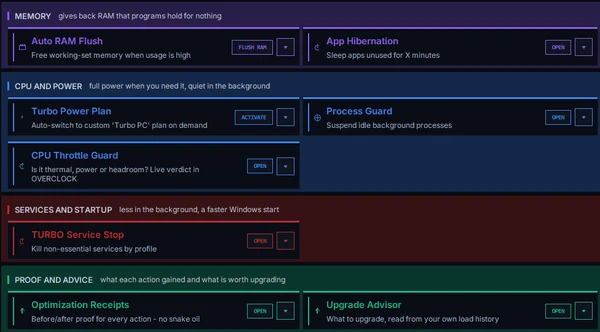
- Receipts. Every optimization in PC Workman leaves the numbers from before and after: how much RAM a flush gave back, to whom, and an honest "you will not feel this" when the gain is small.
- hck_GPT proposes, you decide. Ask "clean up my startup" and it lists the entries worth turning off. A click opens a card: what the program is, who signed it, what turning it off changes, and I agree / Not now / Tell me more. Every decision lands on a list with a big UNDO that puts back exactly what was there.
All of it in one table
| PC Workman | HWiNFO | CCleaner | MSI Afterburner | GPU Tweak III | PC Manager | |
|---|---|---|---|---|---|---|
| Says which reading to trust | Yes | No | - | No | No | No |
| Marks false sensors | Yes | No | - | No | No | - |
| Normal learned for your PC | Per workload | No | - | No | No | No |
| History without setup | Months | Log you start | - | Session, logs | Session, logs | No |
| Every file shown before cleaning | Yes | - | Summary | - | - | Partly |
| Registry cleaning | Never | - | Yes | - | - | No |
| Overclocking | Never | No | - | Yes | Yes | No |
| 1% and 0.1% low FPS | Yes, via RTSS | No | - | Via RTSS | Yes | No |
| Before and after proof | Every action | - | No | - | - | No |
| Asks before changing, with UNDO | Yes | - | Partly | - | - | Partly |
| Price and code | Free, GPL-3.0 | Free personal, Pro paid | Free and paid, closed | Free, closed | Free, closed | Free, closed |
A dash means the tool is not built for that job, which is not a fault. Nobody should use one program for everything, and that includes PC Workman.
What PC Workman does not do
- It does not overclock. Not the CPU, not the graphics card. Use Afterburner or your card maker's tool.
- It does not drive your fans. The Fan Dashboard plans curves and profiles. Your BIOS or the maker's tool applies them, until the stability and the tests allow PC Workman to do it safely.
- It does not clean the registry, update drivers from a third-party database, or delete on a schedule. On purpose.
- It reads fewer sensors than HWiNFO. It reads the ones that matter and explains them.
- The CPU temperature needs a sensor. Without LibreHardwareMonitor on some boards, Windows gives no CPU temperature at all. PC Workman then says "estimate" and never alarms on it, instead of printing a guess as a fact.
What is coming
These are plans, not features, and they are marked that way on the roadmap:
- A verdict after every game: what limited this game on this PC, from the session itself. "RAM 89% on average, 97% at the peak: this game is memory-bound here, 16 GB removes it. The graphics card has room."
- Frame times without RTSS, so 1% lows do not need a second program.
- A guided sensor setup, so the CPU temperature is a reading on every PC, not an estimate.
- PC Workman Central: the hardware health of a whole computer room on one screen, local network only, hardware and never people.
Why it is free, and why GPL now
PC Workman has been built in public since 2025, by one person, on real hardware, with 840 automated tests in the current version. It has no account, no paid tier and no advert. From version 1.9.3 it is licensed under GPL-3.0: anyone may use, study, change and share it, and anyone who distributes it or a changed version must publish the full source under the same licence. A closed, paid copy of this work is no longer possible. That matters to me more than a price would, because the hours went in after taxi shifts, and I want them to stay open.
If one of the big tools answers your question, keep it. If you have ever stared at three hundred numbers and wanted one sentence, that sentence is what I am building.
FAQ
Is PC Workman a replacement for HWiNFO?
Not for reading every sensor: HWiNFO reads almost all of them and PC Workman reads the ones that matter. PC Workman does what HWiNFO leaves to you: it picks the CPU temperature to trust, marks false sensors, learns what is normal for your PC per workload and keeps months of history without setting up logging.
Is PC Workman's Cleanup safer than CCleaner?
It is built to be: 28 known places, every file listed before it is removed, open programs and files from the last 24 hours skipped, and the registry never touched. CCleaner cleans more places and includes registry cleaning.
Can PC Workman overclock my graphics card like MSI Afterburner?
No. It never overclocks. It tells you what limits your clocks, shows an in-game overlay with 1% and 0.1% lows through RTSS, loads a profile per game and keeps the history of every session.
Is PC Workman free?
Yes. Free on the Microsoft Store and on GitHub, with no account and no paid tier, open source under GPL-3.0 from version 1.9.3.