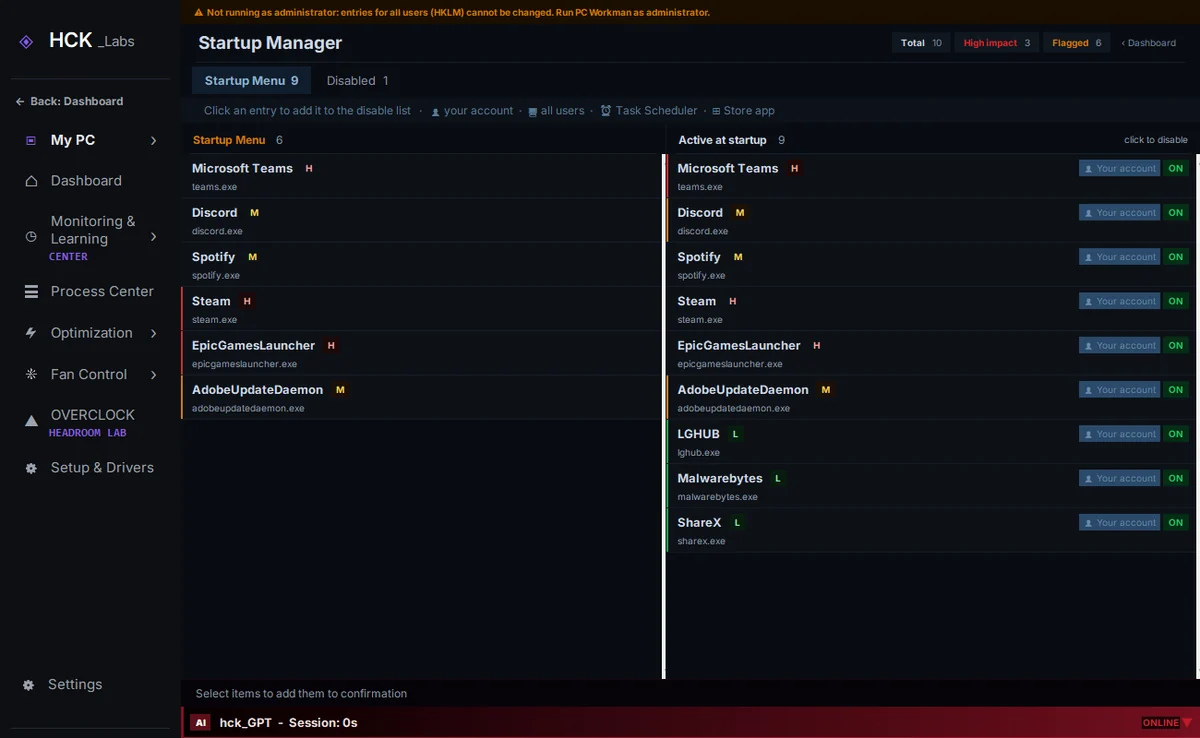
Where startup entries hide
Task Manager's Startup apps tab is where most people look, and it is not the whole story. Many updaters and launchers start from Task Scheduler at logon, and Task Manager does not show those. Startup Manager reads four places:
Registry
- Run for your account (HKCU)
- Run for all users (HKLM)
- Run for 32-bit programs
Startup folders
- Your account's Startup folder
- The Startup folder of all users
Task Scheduler
- Tasks with a logon or boot trigger
- Microsoft's own tasks left out
Store apps
- Apps that registered a startup task (ShareX, Store launchers)
Every row says where the entry comes from, with a small icon: your account, all users, Task Scheduler or Store app. Entries for all users need PC Workman run as administrator to change, and the page says so at the top instead of failing quietly.
Keep, delay or disable, with a reason
"High impact" alone is not advice: the app you open first thing every morning can be high impact and worth keeping. So every entry gets two things: its impact at boot (high, medium, low) and a recommendation with a reason:
- Disable: game launchers and heavy chat clients. "Steam: game launcher, no reason to start with Windows." "Teams: high RAM and CPU at boot, open it when you need a meeting."
- Delay: things you want, just not in the first seconds. "OneDrive: cloud sync runs fine when started later." "Spotify: start it when you actually want to listen."
- Keep: what has to run before you need it. "Malwarebytes: security tool, keep it running." "Logitech G HUB: needed for G-series devices."
The advice comes from a table of 37 known programs and 27 rules by name, kept in open code. Security software, drivers and input device tools are marked critical and protected. The full reasoning is in the guide Which startup apps can I disable?
What each entry costs at startup
Next to every entry PC Workman shows ⏱ seconds of CPU it used in the first three minutes after Windows started, measured on your PC on every start it sees and shown as the median of the last starts, so one slow morning does not brand a program. Run as administrator, the header also shows Windows' own start time and, after you switch entries off, the start time before and after the change.
Turned off, never deleted
Click an entry and it goes into a queue; nothing changes until you confirm the whole queue once. Then:
- Registry entries are switched off with the
StartupApprovedflag, the same one Task Manager uses. The entry stays where it was, and Task Manager shows the same state. - Scheduled tasks are disabled, not deleted, and enabled again the same way.
- Store apps get their startup task switched off.
- Startup folder shortcuts are shown and explained; you move them in Explorer, where they live.
The Disabled tab lists everything that is off, with a button to bring it back. The Optimization Guide's startup step ends with a summary of what was switched off in this run.
Startup Manager, Task Manager, Autoruns, CCleaner
| PC Workman Startup Manager | Task Manager | Autoruns | CCleaner | |
|---|---|---|---|---|
| Registry and Startup folders | Yes | Yes | Yes | Yes |
| Task Scheduler at logon and boot | Yes | No | Yes | Yes |
| Store apps | Yes | Yes | Varies | Varies |
| Keep, delay or disable with a reason | Yes, per entry | Impact only | No | No |
| Reversible the Task Manager way | Yes | Yes | Unticking; delete is permanent | Enable and disable, delete too |
| Who it is for | Everyone | Everyone | Experts | Everyone |
| Price | Free, open source | Built in | Free (Microsoft Sysinternals) | Free and paid |
Where the others are better. Autoruns sees far more: services, drivers, Explorer extensions, codecs and every other place Windows can start code from. If you are hunting malware, use it. Task Manager is already open on every PC. Startup Manager is for the everyday question: which of these can go, and what will I lose?
Questions
Is it safe to disable startup programs?
Disabling does not uninstall anything. It only stops the program from starting by itself; you can start it by hand or enable it again any time. Leave security software, drivers, input device tools and accessibility tools on.
Why does Task Manager show fewer startup apps?
It does not show scheduled tasks that start at logon or boot, where many updaters and launchers register. PC Workman reads all four places.
What does delay mean?
The program is fine to have, but nothing needs it in the first seconds after you sign in. Let Windows finish starting, then open it, or open it when you need it.
Can I undo a change?
Yes. Registry entries use the same StartupApproved flag as Task Manager, scheduled tasks and Store apps are switched off, not deleted. The Disabled tab brings any of them back.
Does it work in the Microsoft Store version of PC Workman?
The list and the advice do. Where Windows does not let a Store app's change stick, PC Workman says so and opens Task Manager's Startup apps tab instead of pretending.
How to open it
In PC Workman: My PC › Startup Manager, or step 1 of the Optimization Guide. Ask hck_GPT "which startup apps can I disable" for the same list in the chat.
Works since PC Workman 1.9.3 · page updated 2026-11-21 · Windows 10 and 11