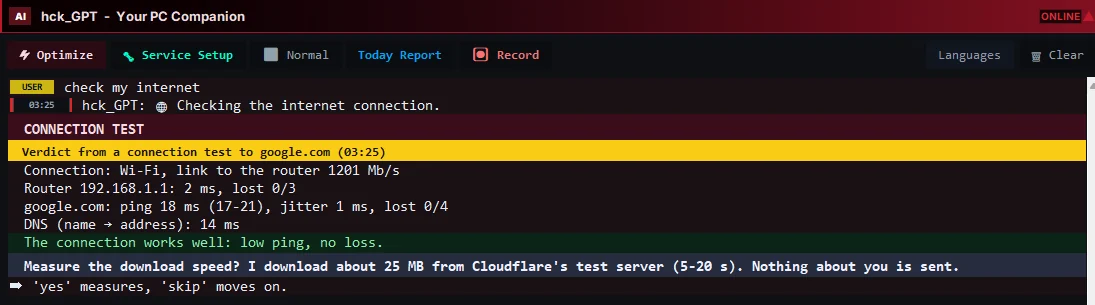
What it checks
- Your router (the default gateway): reachable, how fast, how steady. A slow or lossy router means Wi-Fi or the router itself.
- The DNS: whether names resolve and how long it takes. Pages that load slowly at the start but then run fine are often DNS.
- The internet past the router: ping, jitter and packet loss to well-known hosts.
- The adapter: Wi-Fi or cable, and its link speed.
A verdict in plain words
The answer is one of ten verdicts, for example "It is the DNS: the router answers fast, names resolve slowly" or "The problem is past your router: your network is fine, call your provider", with the steps that fit it. Every number in the answer is marked with where it came from, so nothing is guessed.
Only at the end the guide asks whether to measure the speed. On "yes" it downloads a test file from Cloudflare; on "no" nothing more leaves the PC.
Network test, Speedtest, fast.com
| PC Workman network test | Speedtest | fast.com | |
|---|---|---|---|
| Speed | On request | Yes | Yes |
| Router and Wi-Fi checked | Yes | No | No |
| DNS checked | Yes | No | No |
| Says where the problem is | Yes, 10 verdicts | No | No |
| Server choice and history of results | No | Yes | No |
Where the others are better. Speedtest picks servers, keeps a history and measures upload in detail. For "how fast is my plan", use it. The network test answers "why does it not work right now".
Questions
Why is my internet slow on one PC only?
Usually Wi-Fi: weak signal, a busy channel or an old adapter. If the router answers slowly or loses packets from this PC only, the test says it is on your side, not your provider's.
How do I know if it is my router or my provider?
If the router answers fast and steady but hosts past it are slow or lose packets, the problem is past your router. The test says exactly that.
Is the speed test required?
No. It runs only if you say yes at the end of the guide.
How to open it
In PC Workman: ask hck_GPT "why is my internet slow" or "check my internet".
Works since PC Workman 1.9.3 · page updated 2026-11-21 · Windows 10 and 11