A planner, said plainly
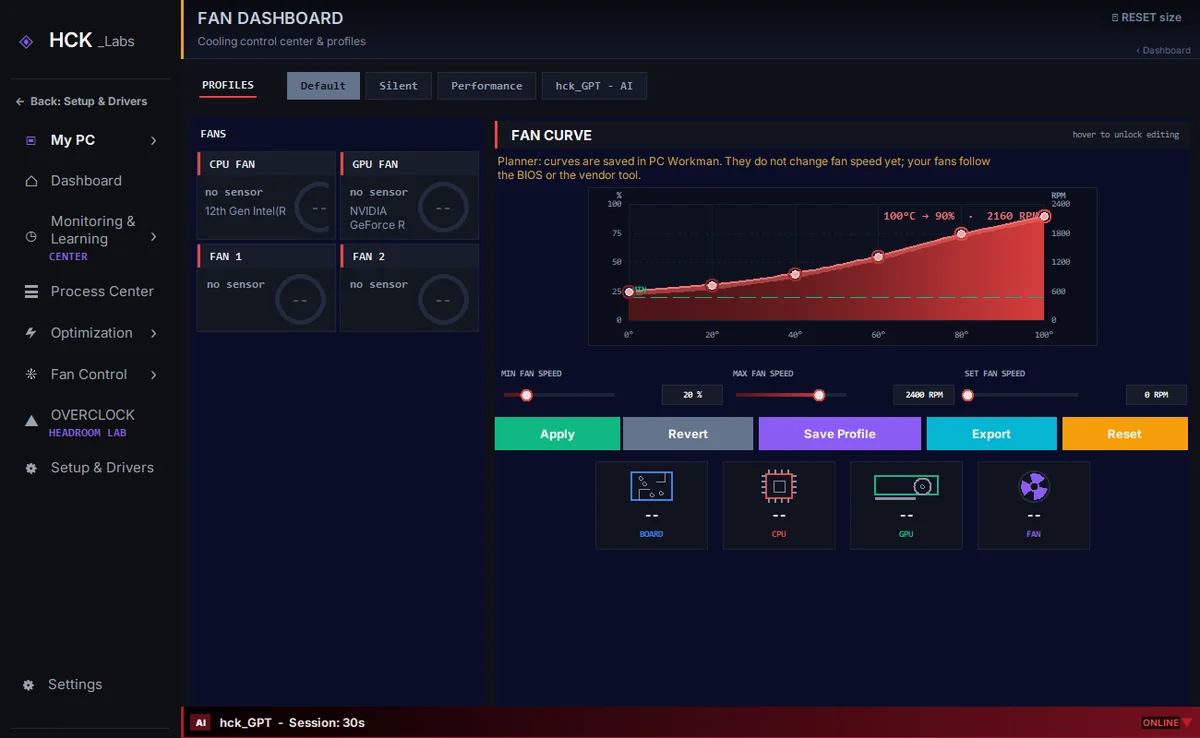
Most PCs give fan control to the BIOS or to the motherboard maker's tool, and laptops lock it completely: even MSI Afterburner cannot set fan curves on most laptops. Fan Dashboard does not pretend otherwise. It lets you plan a curve, save it as a profile and export it, and it says on the page that it does not change the fan speed yet.
Curves and profiles
- Drag-and-drop points on a temperature to fan-speed chart, with the RPM at each point.
- Profiles: Default, Silent, Performance and an AI profile hck_GPT builds from the temperature history of this PC.
- Minimum and maximum speed sliders so a curve never stops a fan that must spin or runs it louder than you allow.
- Apply, Revert, Save Profile, Export, Reset: every curve can go to a file and back.
Fan cards, live
Cards for the CPU fan, the graphics card fan and the case fans show the current speed when the board reports it, through LibreHardwareMonitor. When it does not, the card says "no sensor" instead of drawing a number. Fan history fills in over time in Usage Statistics.
Fan Dashboard, Fan Control, MSI Afterburner
| PC Workman Fan Dashboard | Fan Control | MSI Afterburner | |
|---|---|---|---|
| Drives the fans | Not yet: plans and exports | Yes | Graphics card only, not on most laptops |
| Curve editor | Drag and drop | Yes, many curve types | Yes |
| Profiles | 4, including AI | Yes | Yes |
| Linked to temperature history and norm | Yes | No | No |
Where the others are better. Fan Control drives case fans directly today, with mixed and linked curves; use it if you need control now. Fan Dashboard plans curves next to the history and the learned norm of your PC.
Questions
Can I control my fans from Windows?
On many desktops yes, through the motherboard maker's tool or Fan Control. On most laptops no: the curve is fixed in the BIOS. Fan Dashboard plans curves and shows what your PC reports.
What is a good fan curve?
Quiet and flat up to around 50 to 60 °C, then rising steadily so the fans reach full speed before the CPU's limit. The Silent and Performance profiles are starting points.
Why does it say no sensor?
Your board does not report that fan's speed to Windows, or LibreHardwareMonitor is not running. PC Workman shows that instead of a made-up number.
How to open it
In PC Workman: Fan Control › Fan Dashboard in the side menu.
Works since PC Workman 1.9.3 · page updated 2026-11-21 · Windows 10 and 11