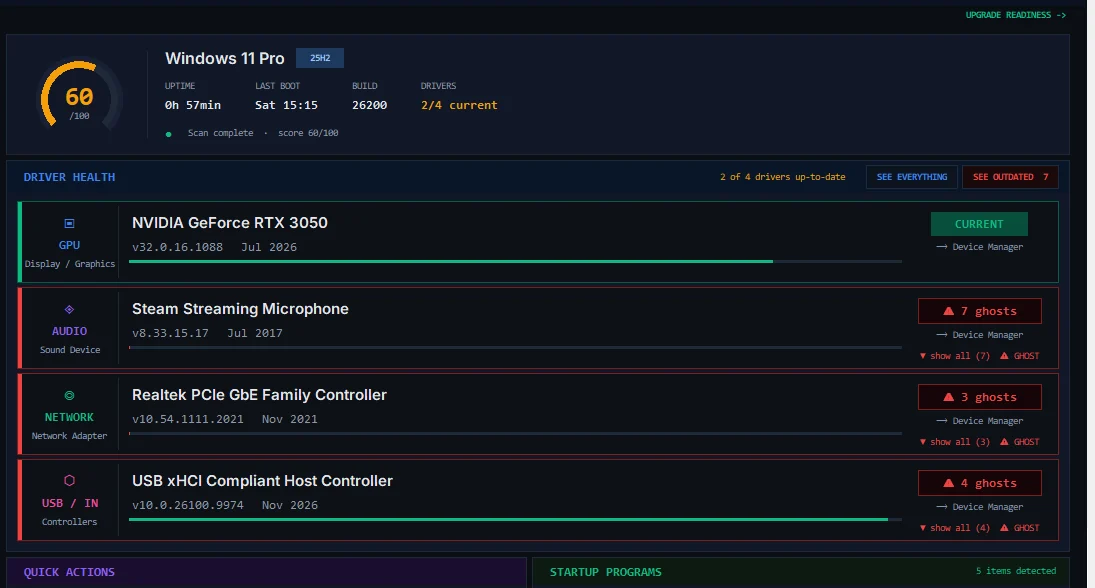
Ghost drivers
Windows keeps the driver of every device that was ever connected. Device Manager hides them unless you switch on "Show hidden devices". Most are harmless, but old audio and network ghosts can confuse which device Windows picks, and a long list slows driver searches. On my PC: 7 ghosts of a Steam Streaming Microphone, 3 of the network card, 4 of a USB controller.
Setup & Drivers groups the ghosts by device, says what each group was, and opens Device Manager one click away; there, View › Show hidden devices lists them, and you remove what you choose, where Windows expects it.
Driver age, rated calmly
A driver from 2017 for a USB controller is fine; a graphics driver from two years ago in a new game is not. The page rates the age per device class instead of shouting "outdated" at everything, and says where to update: Windows Update for most devices, NVIDIA App or AMD Adrenalin for graphics.
Readiness at a glance
The header shows Windows edition and build, uptime, the last boot, and a readiness score with the number of drivers that are current. Quick actions open Windows Update, Device Manager, Services, Task Scheduler, System Information and MSConfig.
Setup & Drivers and the alternatives
| PC Workman Setup & Drivers | Device Manager | Driver updaters | |
|---|---|---|---|
| Ghost drivers shown | Yes, grouped | Behind "Show hidden devices" | Rarely |
| Driver age rated per class | Yes | Date only | "Outdated" for everything |
| Installs drivers from its own database | No, on purpose | No | Yes, risky |
| Price | Free | Built in | Often paid |
Questions
What are ghost drivers?
Drivers of devices that are no longer connected: old mice, headsets, USB sticks, a previous graphics card. Windows keeps them; Device Manager shows them only with Show hidden devices.
Is it safe to remove ghost drivers?
Mostly yes for devices you will not plug in again. If you do plug one in, Windows installs the driver again. Leave anything you are unsure about.
Should I use a driver updater?
No. Use Windows Update for most devices and the graphics vendor's app for the graphics card. Third-party updaters sometimes install the wrong driver and often upsell.
How to open it
In PC Workman: Setup & Drivers in the side menu, or step 6 of the Optimization Guide.
Works since PC Workman 1.9.3 · page updated 2026-11-21 · Windows 10 and 11