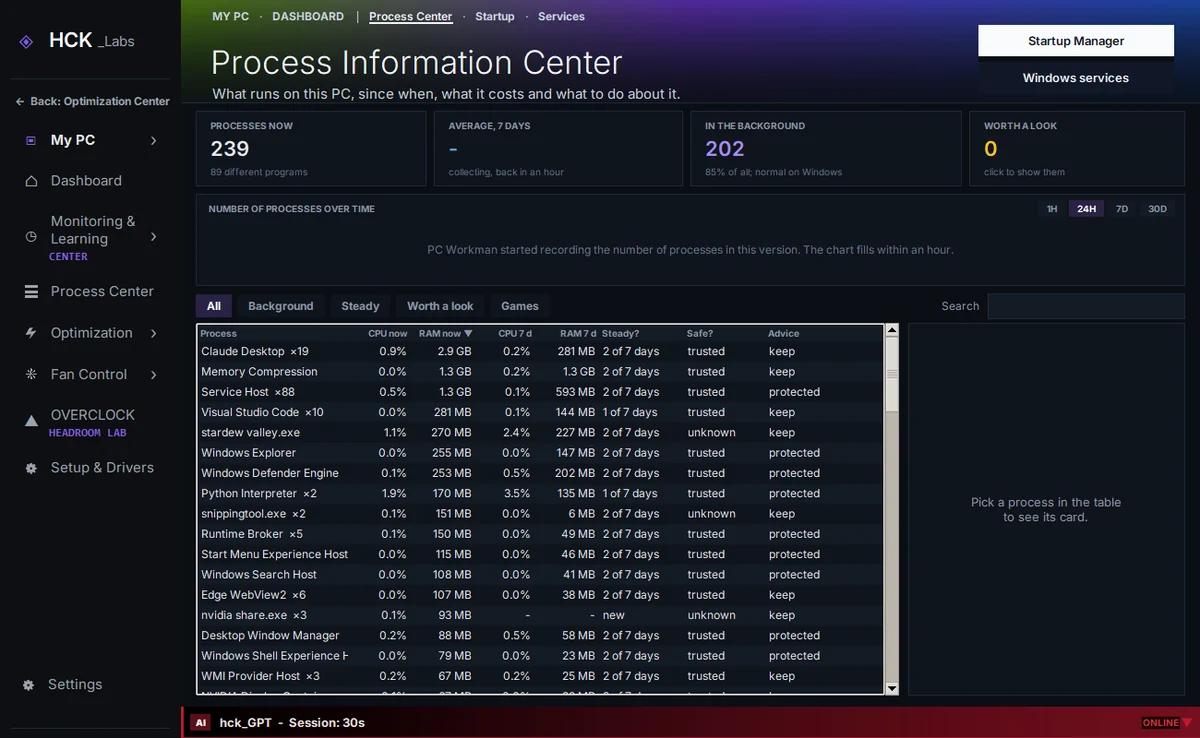
Every process, in plain words
PC Workman carries a library of 522 Windows processes, each with what it is, who makes it, whether it is safe to close and what happens if you do. Hover a row and a card shows it; click and the full card opens next to the table. A process that is not in the library is shown with what can be read from it, and one click asks hck_GPT.
- Now and over 7 days: CPU and RAM this second next to the 7-day average, so a process that is busy once is not confused with one that is always heavy.
- Advice: keep, protected (Windows needs it), or worth a look.
- Filters: all, background, steady, worth a look, games, and a search box.
Processes that pretend
Malware likes Windows names. Process Guard checks every running process for the usual tricks: a "svchost.exe" running from AppData instead of System32, a name one letter off a Windows one ("scvhost"), look-alike characters, and known coin-miner and dropper names. A match is listed under worth a look, with the reason.
Process Center, Task Manager, Process Explorer
| PC Workman Process Center | Task Manager | Process Explorer / System Informer | |
|---|---|---|---|
| Says what a process is | Yes, 522 described | Name and publisher | Description from the file |
| Safe to close? | Yes, per process | No | No |
| 7-day averages | Yes | No | No |
| Spots fake Windows processes | Yes | No | Signature and VirusTotal checks |
| Depth (handles, threads, DLLs) | No | Some | Everything |
Where the others are better. Process Explorer and System Informer show every handle, thread and DLL and can check files against VirusTotal; for digging deep they are the tools. Process Center answers the question most people have: what is this, and can it go?
Questions
What is this process, and is it safe?
Find it in Process Center: the card says what it is, who makes it and whether it is safe to close. If it is not in the library, ask hck_GPT from the same row.
Can I end svchost.exe?
Usually not: svchost hosts many Windows services at once. Process Center marks it as protected; if one svchost uses a lot of CPU, the services inside it are the thing to look at.
How do I know if a process is a virus?
Watch for a Windows name in the wrong folder (svchost.exe outside System32), a name one letter off, or an unknown process that is always busy. Process Guard checks for exactly those and lists matches with the reason.
How to open it
In PC Workman: Process Center in the side menu. Ask hck_GPT "what is name.exe" for the same card in the chat.
Works since PC Workman 1.9.3 · page updated 2026-11-21 · Windows 10 and 11