What stays on your PC
- The history of CPU, GPU and memory use, and the norms learned from it.
- hck_GPT conversations, cleanup and optimization receipts, health reports.
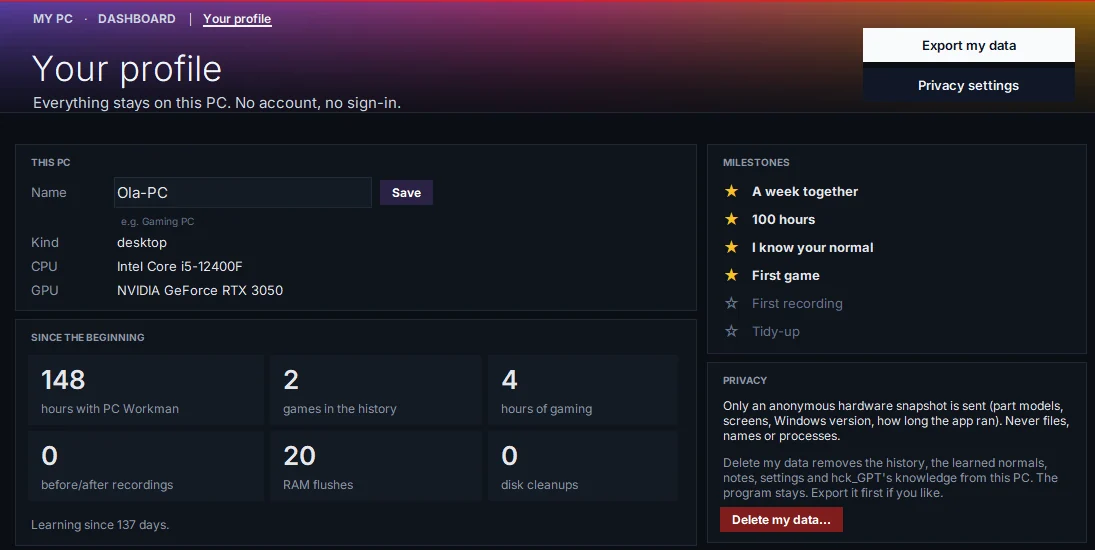
- Your profile: the PC's name, hours with PC Workman, games and hours of gaming, recordings, RAM flushes, disk cleanups.
Export my data on the profile page writes it out, so you can keep it or move it. Delete my data removes it from the PC, after a confirmation that says how many files go.
What anonymous telemetry may send
Telemetry is anonymous, and the server keeps only these fields and drops anything else:
| Field | What it is |
|---|---|
| install id, session id | Random identifiers, not linked to you |
| app version, time, kind | Which version, when, which event |
| session length | Minutes PC Workman ran |
| OS, country | Windows version and the country of the request |
| CPU, cores, GPU, RAM size and speed, disks, motherboard, screens | Hardware models, to know what to support |
No IP address is stored, no file names, no process lists, no chats. The server code is open to read.
How to turn it off
Settings › Privacy: one switch for telemetry, and one for all network use. With network use off, PC Workman works fully offline: telemetry and the speed test stay off, and nothing is sent.
Questions
Does PC Workman collect my data?
Your data stays on your disk. Only anonymous telemetry may leave the PC: a fixed list of hardware models, Windows version, app version and session length, without your IP address. You can turn it off.
Do I need an account?
No. There is no account and no sign-in.
How do I export or remove my data?
Profile › Export my data writes it out. Profile › Delete my data removes the history, learned norms, notes, settings and hck_GPT’s knowledge at the next start, after you confirm; the program stays.
How to open it
In PC Workman: My PC › Your profile, and Settings › Privacy for the switches.
Works since PC Workman 1.9.3 · page updated 2026-11-21 · Windows 10 and 11