PC_Workman: not just monitoring,
An assistant that understands your hardware |

hck_GPT with 96 PL/EN intents and no cloud API. TURBO, Upgrade Readiness, Ghost Driver Detection, DeepMonitor and Fan Dashboard. Learns your specific hardware, not generic thresholds.

Build in Public hck_GPT 96 intents Open Source MIT
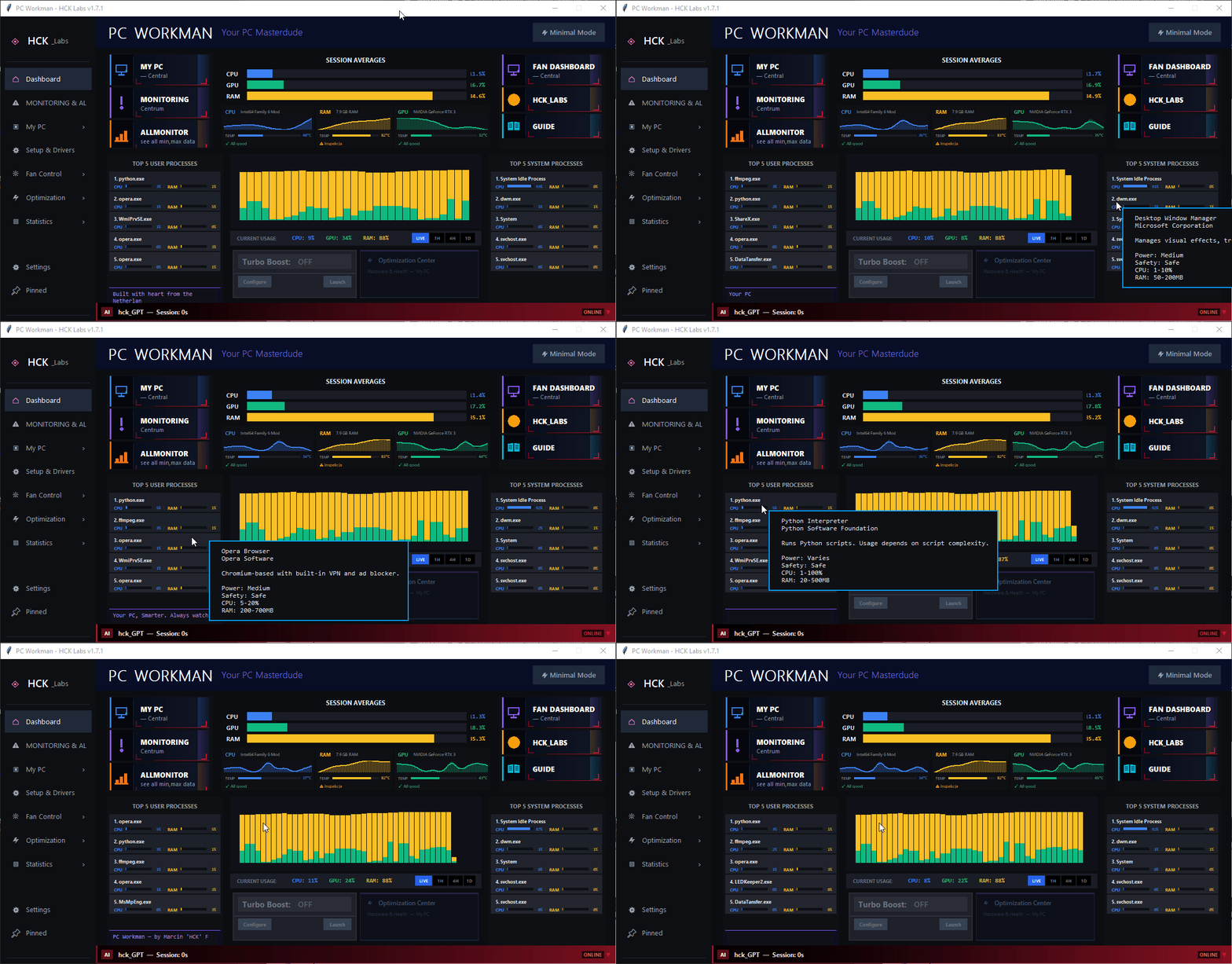
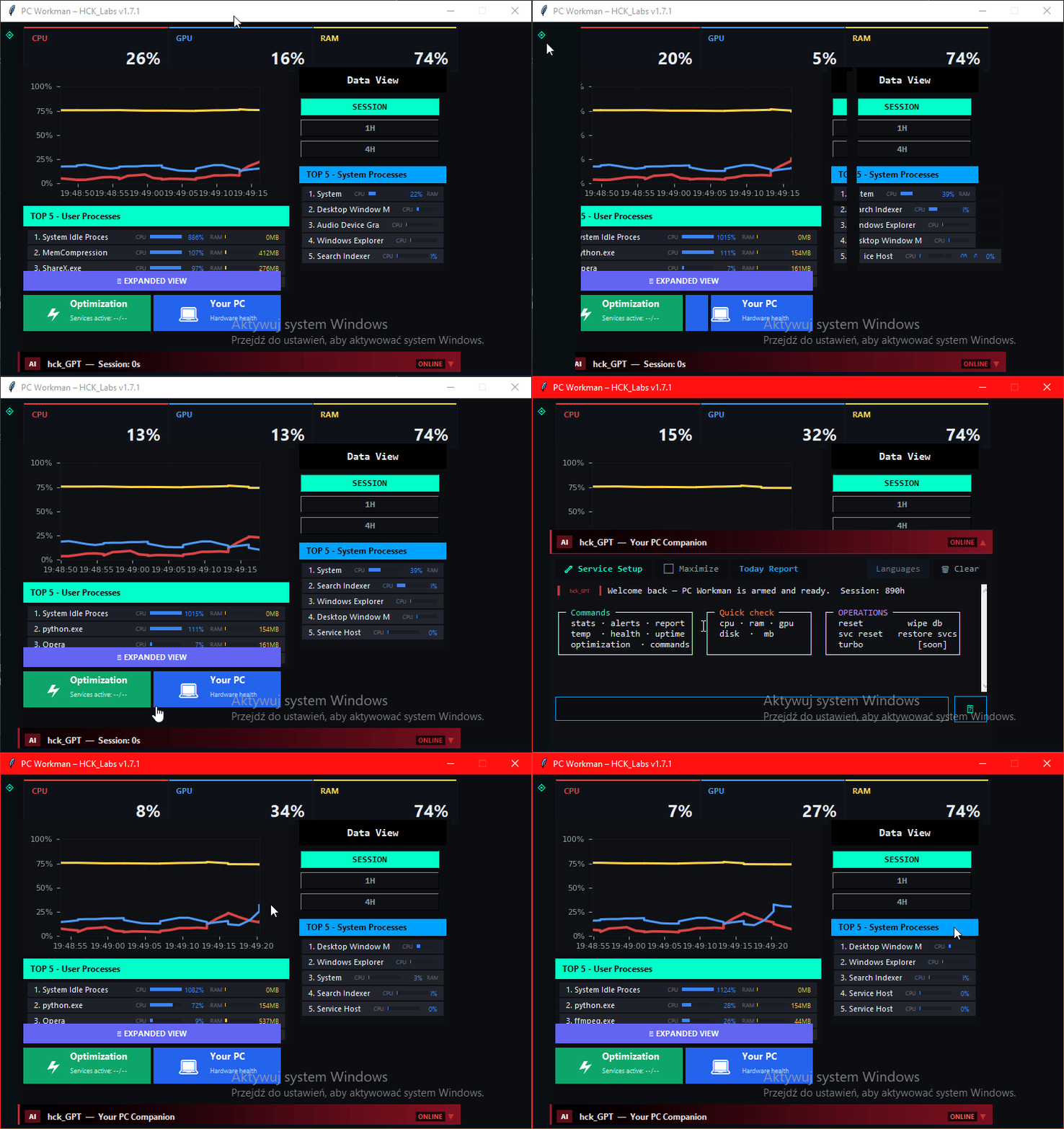
PC Workman v1.8.5 main dashboard with live system monitoring
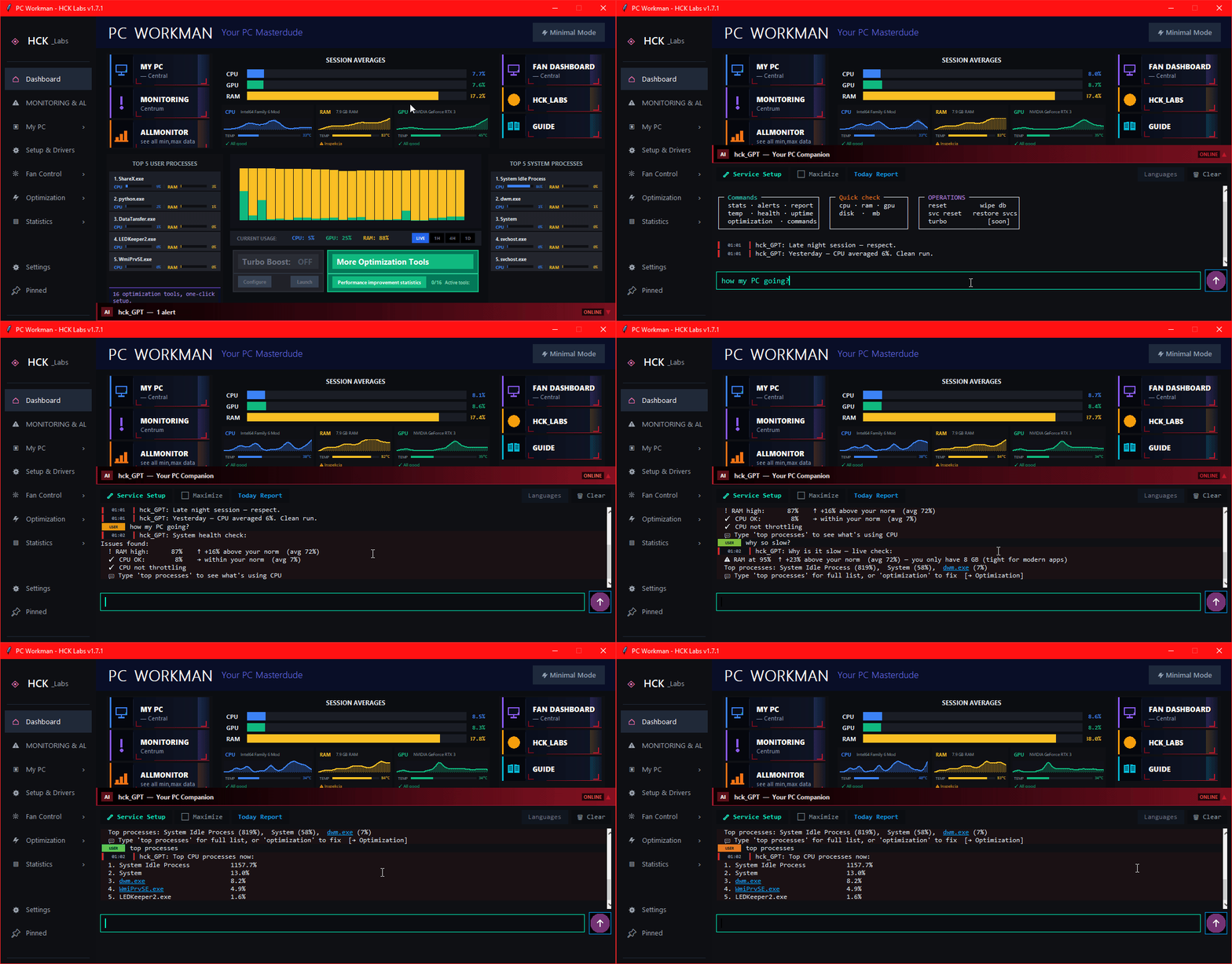
hck_GPT in action
hck_GPT – chat with PC assistant, 9-layer logic
9-layer logic
Scroll
Fresh from the blog →

Architecture

5 Modules, One Program

Each does one thing well. Together they form something HWMonitor and Afterburner will never combine.

LIVE
My PC
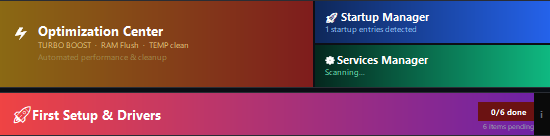
Navigation hub. Stats & Alerts, Optimization Center, Startup Manager, Services Manager, First Setup & Drivers, Stability Tests, Your Account, everything in one place.
My PC – navigation buttons to all modules
4 / 16 LIVE
Optimization Center
TURBO mode one toggle: Auto RAM Flush (>75%), Turbo Power Plan, Turbo Service Stop, Process Guard.
Service profiles: Gaming, Economy and your own Manager list.
Gaming 18 candidates Economy 21 candidates Manager your list
LIVE
AllMonitor
HWMonitor in a more modern form. CPU, GPU, RAM, disks, voltages, everything in real time. Data feeds the Stats & Alerts engine and powers hck_GPT to be more useful every day.
LIVE
Fan Dashboard
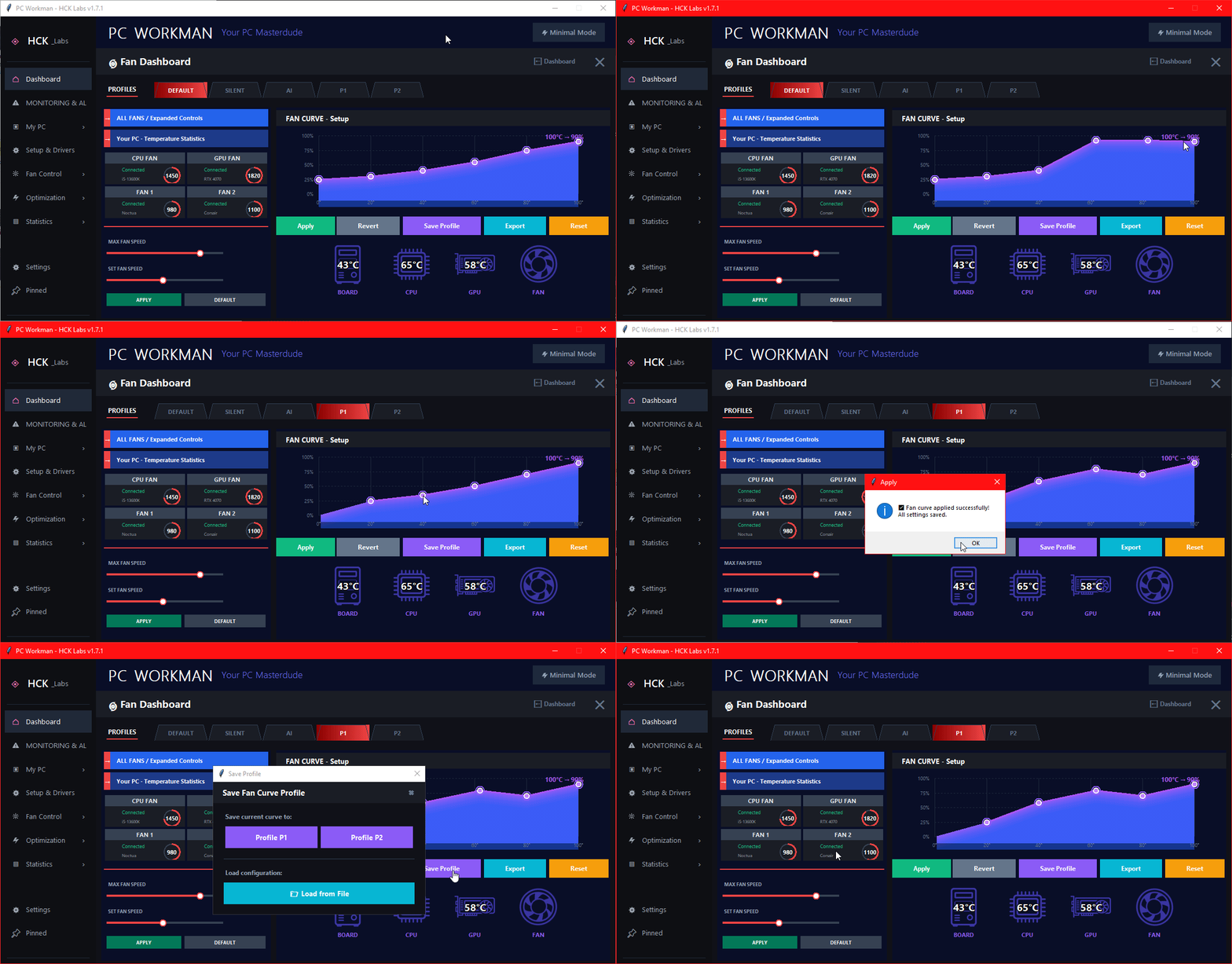
Custom RPM curves with drag-and-drop points. 2×2 fan status cards with real-time RPM. Profiles: Default, Silent, AI, P1, P2, saved to JSON, importable. Full cooling control.
Fan Dashboard – fan curve editor, RPM monitoring, profiles
LIVE
GUIDE
Program guide + innovation: Guide on program LIVE. Greets the user on first launch, highlights specific Dashboard elements and quickly explains what each one does. Onboarding that doesn't annoy.

Inside My PC

Managers that actually do the job

Not dashboards for aesthetics, each one has a concrete action to perform.

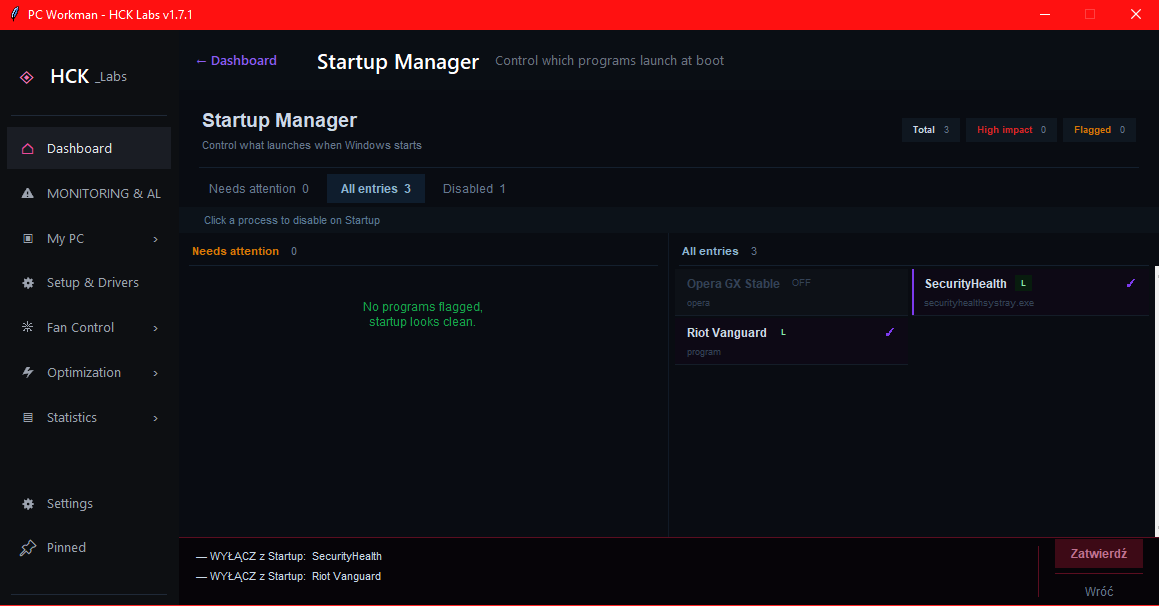
Startup Manager – managing Windows autostart
My PC - Startup Manager

What launches with Windows, and why it takes so long

Full list of processes starting with the system. See the boot impact of each entry, disable unnecessary ones with one click. No need to dig through msconfig or regedit. End of "Windows takes 3 minutes to start because Spotify decided it was important".

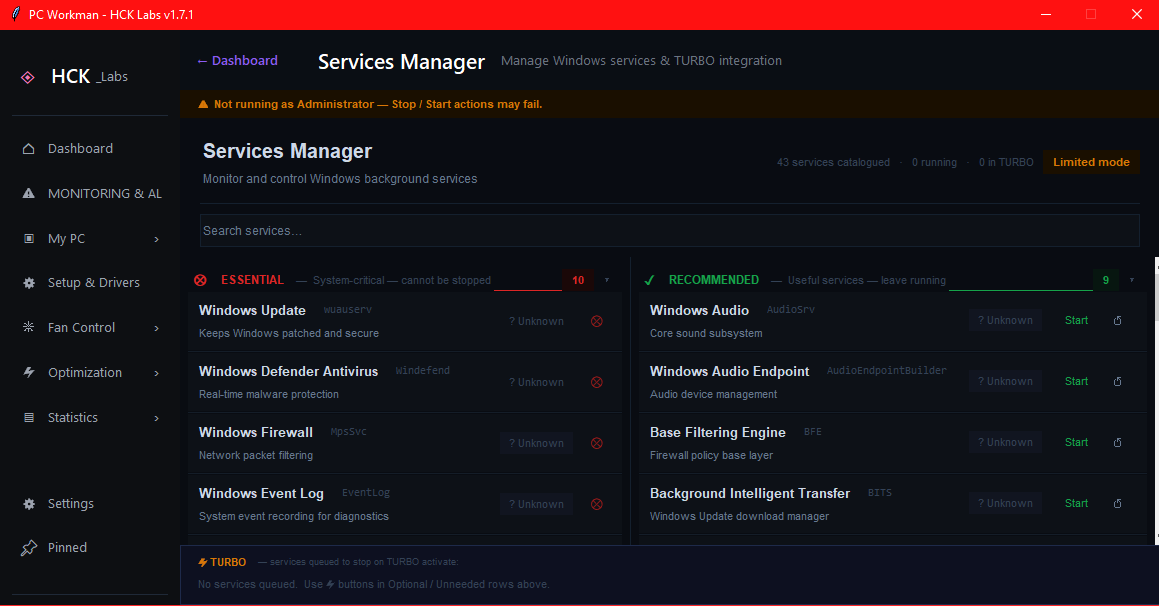
Services Manager, Windows services and TURBO profile controls
My PC + Optimization Center - Services Manager

Windows services under control: Gaming, Economy or your own list

Manual service management + three ready-made modes in Optimization Center: each stops a different set of non-essential services. Whitelist protects critical processes, no crashes. Revert with one click, state saved to JSON.

Gaming: 18 candidates Economy: 21 candidates Manager: user-composed
NEW · v1.7.7 Driver Health

Ghost Driver Detection

You replaced a GPU years ago. The old driver is still in Windows, silently. Device Manager hides it by default. Most monitors don't see it at all.

PC_Workman compares Windows registry entries against pnputil /connected, which returns only hardware that's physically present. The gap is your ghost.

GPU · Audio · Network · USB pnputil removal
# registry says:
NVIDIA GeForce RTX 3050  ← active
NVIDIA GeForce GT 1030   ← ghost
# pnputil /connected says:
NVIDIA GeForce RTX 3050  ✓ connected
<GT 1030 not present>    ⚠ ghost

Shown with bordeaux background + ⚠ badge. One click → details + optional removal with admin confirmation.

NEW · v1.7.8 Monitoring & Alerts , adaptive baselines, not static thresholds

Thermal Baseline Learning

Every monitoring tool uses the same 80°C threshold for every machine. 72°C gaming on an air-cooled mid-tower is fine. The same 72°C during idle on a thin laptop is not.

PC_Workman classifies each snapshot into one of five workload buckets and keeps a lifetime Welford mean + σ per bucket. A bucket becomes usable after 20 real sensor samples and calibrated after 200. The tooltip shows how far the current reading sits from your learned range.

# workload buckets (live example)
idlecpu <15% 36°C ±2.1
light15–40% 48°C ±3.4
medium40–70% 63°C ±4.1
heavy≥70% 78°C ±5.8
gaminggpu≥60% 71°C ±4.2
# tooltip at 77°C while gaming:
"8% above usual (Gaming: 65–78°C)"

Voltage SPC, Median + MAD

Mean + σ breaks on voltage data: one spike shifts the mean, widens the band, and the next spike passes silently. Median is immune. MAD inherits that.

Four Nelson SPC rules run on rebuild: isolated spike, 2-of-3 cluster, 9-point sustained deviation, 6-point monotonic trend. 12V spikes during GPU load changes are suppressed, they're physically expected. Patterns that repeat ≥5× are decayed to "your hardware's normal".

# Iglewicz-Hoaglin 1993
M = 0.6745 × (x − median) / MAD
# thresholds
|M| > 3.5 anomaly
|M| > 2.5 warning
# Nelson rules
Rule 1 isolated spike
Rule 5 2-of-3 beyond warning
Rule 2 9 consecutive same side
Rule 3 6 consecutive monotonic
Requires LibreHardwareMonitor for voltage data
Also in v1.7.8: Pan + zoom charts Click-pin tooltip with baseline deviation Minimap navigation Proactive voltage alerts in hck_GPT

Gamers & Developers

Built to respect what you're doing

An optimizer that freezes your anti-cheat mid-match, or your build mid-compile, is worse than no optimizer. So PC Workman knows what it must never touch.

HARD RULE
Anti-cheat, never touched
Vanguard, EasyAntiCheat, BattlEye and FACEIT are blocked from every optimization: no suspend, no priority change, no memory trim. One frozen anti-cheat can crash your game or trip a ban, so this is a safety rule written into the code, not a setting you have to find.
Riot Vanguard EasyAntiCheat BattlEye FACEIT PunkBuster GameGuard
YOUR CALL
Your tools stay full-speed
App Hibernation only ever sleeps apps that are genuinely idle, and only the ones you opt in. An active build, your editor, or a running AI assistant keeps every core. Nothing is killed, everything restores in one click, and you can exclude any process by name.
VS Code Claude Docker IntelliJ Node / npm git

Anti-cheat is blocked by rule. Idle apps sleep only if you opt in. Everything is one click to restore.

Built-in assistant

hck_GPT: 9-Layer Logic

Not an LLM API. Own local decision logic, fast, offline, specific.

96 intents - recognized query patterns, PL + EN
01 Intent Recognition 96 intents + aliases → classification (EN + PL)
02 Context Classification gaming / work / idle / thermal / voltage...
03 Live Hardware Query queries real-time data from AllMonitor
04 Session History Check session min/max, previous anomalies
05 Stats & Alerts Lookup compares against your PC's learned norms
06 KB Profile Match TDP, Tj_Max, hotspot for your CPU/GPU
07 Response Generation answer with numbers, not generics
08 Action Suggestion concrete action if something needs attention
09 Format & Deliver clean output in the chat panel

Quick aliases in both languages, type "temp", "voltage", "gaming", "weekly", "fans" and you know immediately what's going on. No waiting.

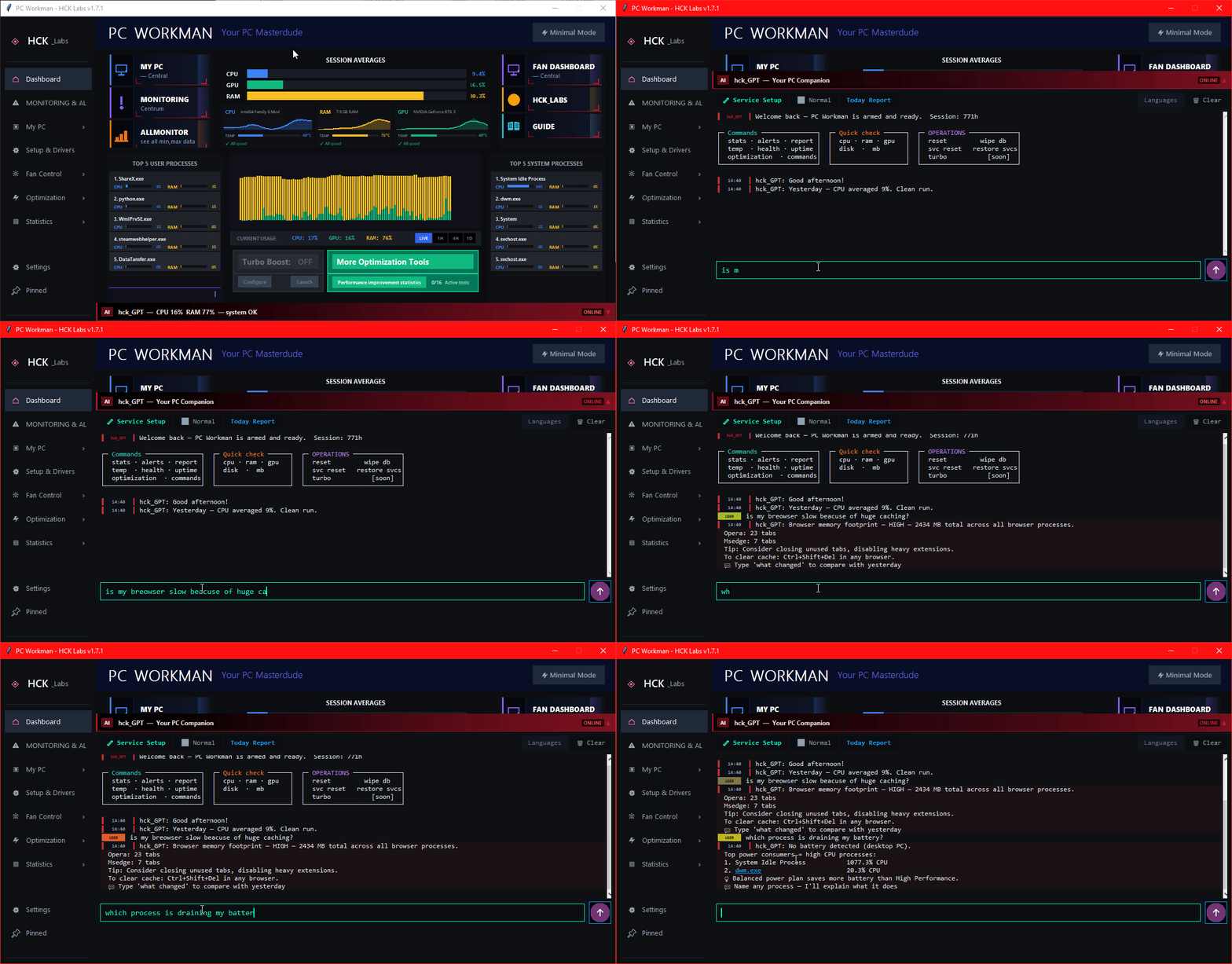
hck_GPT – 96 intents in action, query recognition

96 intents, Polish and English, auto-detected per message

hck_GPT – sample conversation, contextual answers

Real conversation, data from your hardware, not the internet

Introduced in 1.7.9

Full-screen control center

One click (⤢) and the dashboard rebuilds into a symmetric full-screen layout.

MAXIMIZED VIEW MODE

TOP 8 processes on both sides, chart hub in the center

Hardware cards grow into mini-charts with the component name ("CPU Intel64…", "RAM 7.9 GB") drawn inside the chart corner. Turbo Boost and Optimization Center docked at the bottom.

GAMING-HUD TOOLTIP

Hover. Pin. Watch the age tick.

A translucent (72%) detail box follows your cursor over the chart. Click = PIN, styled like the hck_GPT strips: the tooltip docks to its bar, the sample age refreshes live, and the pin travels with the LIVE buffer.

HCK_GPT EVERYWHERE

Chat on MY PC and FAN DASHBOARD

The assistant banner no longer disappears when you leave the dashboard, and the chat is taller in maximized mode (+12%, Maximize mode +35%). Under the hood: −1326 lines of dead code and a dozen resource leaks gone.

Introduced in 1.8.0

Smart Learning that actually accumulates

It learns YOUR machine over time, and now you can see exactly what it knows.

🧠  LEARNING CENTER  ·  live view of what your PC has learned
WORKLOAD-AWARE TEMPS

82°C: normal while gaming, critical at idle

Same number, opposite verdict. hck_GPT judges temperature against your learned norm for the current workload (z-score), not a hardcoded 85°C cutoff, so it stops crying wolf during normal gaming.

LEARNING CENTER

See what it learned, live

Per-workload training progress and learned ranges, voltage SPC baselines, a live PSU health score, and a ↻ Rebuild self-check that re-thinks from your data on the spot.

NEVER FORGETS

Welford accumulator

Learning accumulates for the life of the install and survives 90-day data pruning, not a 14-day window. The longer it runs, the more it knows your hardware. How it works →

Introduced in 1.8.0

An overlay that shows nothing until you choose

Every gaming tool decides what your overlay shows. This one starts empty, you drop in exactly what you want.

🎮  MY PC → GAMING / IN-GAME  ·  build your own layout, then test it live
STARTS EMPTY

You choose what it shows

Temps in one corner, FPS in another, nothing else. A glance when you want it, invisible when you don't, floating over borderless games without stealing focus.

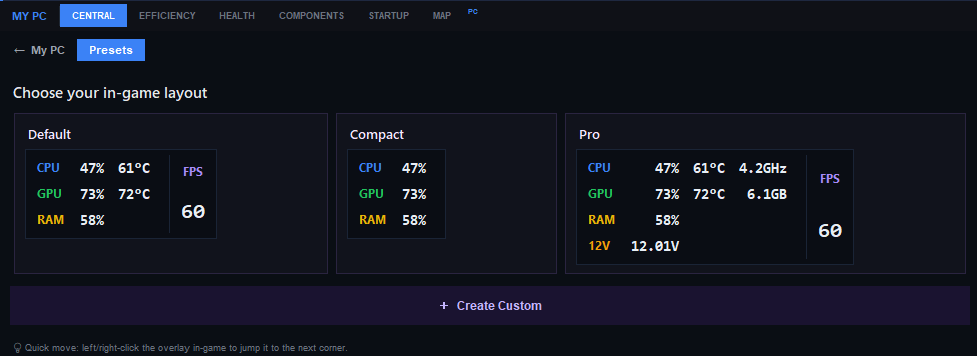
3 READY LAYOUTS

Default · Compact · Pro

In a hurry? Pick a preset and you're done. Or open Create Custom and build it row by row, each field a dropdown, no duplicates, with a live preview that matches the overlay 1:1.

KNOWS YOUR GAME

A hello when you launch

PC Workman sees the game start and drops a one-second greeting in the corner, "Good luck at the tournament!" for CS2, "Breeding an albino today?" for Planet Zoo. 40+ games, two languages.

The three PC Workman in-game overlay presets: Default, Compact and Pro

Lifetime learning

Stats & Alerts: A baseline from the first samples

Every PC is different. An RTX 4070 in one build runs at 78°C, in another at 84°C, and both can be normal. PC Workman separates samples into five workload profiles and learns your norm independently for idle, light, medium, heavy and gaming.

A profile becomes usable after 20 real samples and reaches the calibrated level at 200 or more. Until then, the app uses conservative fallback thresholds. Its Welford accumulators retain the learned statistics for the life of the installation, even after the oldest raw samples are pruned.

Example: learning CPU temp norm (i7-12700K)
Normal: 58–74°C  ·  Boost peak: 89°C  ·  Alert >91°C sustained
Example: learning 12V voltage norm
Normal: 11.94–12.06V  ·  Alert at: <11.7V or unnatural spike frequency
01

Natural temperature drift

Steady +3–5°C over several weeks = signal to replace thermal paste. Detected before CPU starts throttling.

02

Unnatural voltage spikes

Median, MAD and Nelson rules find deviations from the rail's own baseline. A recurring safe pattern can decay into a new normal.

03

Five workload contexts

A gaming temperature is not judged like an idle temperature. Every context has its own sample count, mean and learned range.

Compact mode

Minimalistic View Mode

PC_Workman Minimalistic View Mode – compact monitor

Compact display mode, smaller window, key metrics on top. Originally considered the main look of PC_Workman, it stepped aside for the full expanded view with 5 modules and a richer UI.

// STATUS, stable, lower priority

Minimalistic View works reliably, it runs hck_GPT, TURBO suite, and all monitoring features in a compact always-on-top window. Not actively extended right now; the main development focus is on the expanded view and the current roadmap. A fuller rebuild remains planned.

Comparison

PC_Workman vs Competition

MSI Afterburner, HWMonitor, GPU Tweak, GeForce Experience, HWInfo

Feature MSI AB HWMonitor GPU Tweak GFE HWInfo PC_Workman
AI assistant (local) hck_GPT, 96 intents, offline
Ghost Driver Detection pnputil /connected, v1.7.7
Learns your PC's norms a baseline per workload
TURBO mode (4 functions toggle) RAM + Plan + Services + Guard
Explains spike causes with AI context
Fan curve control Fan Dashboard
Weekly Report / history Partial charts, insight cards
Suspicious process detection automatic
One-click optimization + revert LimitedLimited full undo
Requires login ✅ 😒 privacy
Open Source GitHub MIT

The only alternative with local AI that learns your PC

Check it on GitHub

Build in Public

My Journey Solo Dev

Authentic story, no startup glamour

From Job Loss to Indie Project

December 22nd I lost my job in the Netherlands. Came back to Poland with one thing, determination to build something of my own. PC_Workman is being built on a 2014 laptop that regularly hits 90°C+. Not waiting for perfect hardware, building now.

No VC money and no team. One year of building in public, late-night refactoring, and every line of code solving a real problem. From the first dashboard to a Microsoft Store product, 96 hck_GPT intents, 485 process definitions and a 229 tests in the current source suite.

"Constraint breeds creativity. The old laptop taught me to optimize every feature. That's the same experience PC_Workman gives its users."

Release updates

No pretend newsletter. New builds and full release notes are published on GitHub.

Latest Updates

v1.8.5: Upgrade Readiness with a 330-part offline compatibility database, a rebuilt Fan Dashboard, My PC re-entry in 1–17 ms and a test suite expanded from 21 to 194 tests.

v1.8.2: fixes for critical freezes, administrator elevation and UI scaling, plus another hck_GPT expansion.

PC Workman reached the Microsoft Store. Installation no longer requires unpacking a ZIP, and updates pass through the Store certification process.

FAQ

Questions worth asking before you download

hck_GPT runs locally and recognizes 96 intents in Polish and English. High-confidence matches go to deterministic handlers that read live hardware data and local history. Open-ended questions can use an optional local Ollama model. No cloud AI or API key is required.

The TURBO suite combines four tools: Auto RAM Flush with exclusions, Turbo Power Plan, Turbo Service Stop with Gaming, Economy and user-composed Manager profiles, and Process Guard. Changes are reversible, settings persist, and anti-cheat processes are protected from suspension and trimming operations.

Learning starts with the first samples. Each of the five workload profiles becomes usable after 20 samples and reaches the calibrated level at 200 or more. Conservative fallback thresholds remain active until then. The statistics accumulate for the life of the installation, so the model keeps maturing as you use the app.

MSI Afterburner is great for GPU OC and OSD, shows raw data. PC_Workman explains what that data means in the context of your specific PC. There's no single "killer feature" here, it's a different tool with a different goal. AB: overclocking and monitoring. PC_Workman: an assistant that learns your hardware, optimizes the system and answers hardware questions locally.

PC Workman was started on a 2014 i7-4710HQ laptop and supports 64-bit Windows 10 and 11. A basic installation needs about 100 MB. Temperature, voltage and fan readings depend on the sensors exposed by the machine; optional LibreHardwareMonitor adds more readings.

For basic monitoring (CPU/RAM/GPU usage, temps), no. For TURBO mode (stopping services, changing power plans, suspending processes), yes, those are system operations. The program only asks for privileges when needed. Full source code on GitHub, you can verify every line.

Yes. The interface and hck_GPT support Polish and English. The interface language is selected in Settings, while hck_GPT detects the language of each message.